---
title: "MCC: Using Email and Text Templates"
description: "MCC: Using Email and Text Templates"
---
[Skip to content](https://support.spotio.com/hc/en-us/articles/19482762989847-mcc-using-email-and-text-templates#main-content)
English
Show submenu for translations
[](https://support.spotio.com?hsLang=en)
Open main navigation
Close main navigation
- English
Show submenu for translations
How can we help you?
- There are no suggestions because the search field is empty.
1. [SPOTIO Knowledge Base](https://support.spotio.com/?hsLang=en)
2. [Knowledge Base](https://support.spotio.com/knowledge-base?hsLang=en)
3. [Sales Rep](https://support.spotio.com/knowledge-base?hsLang=en#sales-rep)
May 20, 2026
# MCC: Using Email and Text Templates
Whether in the field or from a desk, SPOTIO templates are a quick way to communicate with prospects or customers. Email and text templates will aid you in streamlining your communication and enhance your messaging productivity.
### Using Text Templates
Users with assigned SPOTIO numbers are able to utilize text templates.
### Outbound Text Templates - Mobile
To use a template for an outgoing text message on the mobile app:
1. Select the record by tapping or searching to access the record's details.
2. Tap on the **Text** bubble icon.
3. Click the *templates* icon in the bottom left corner.
4. Select the active template you are wanting to send.
5. Hit the **Select** button.
6. Hit the *arrow* icon to complete.
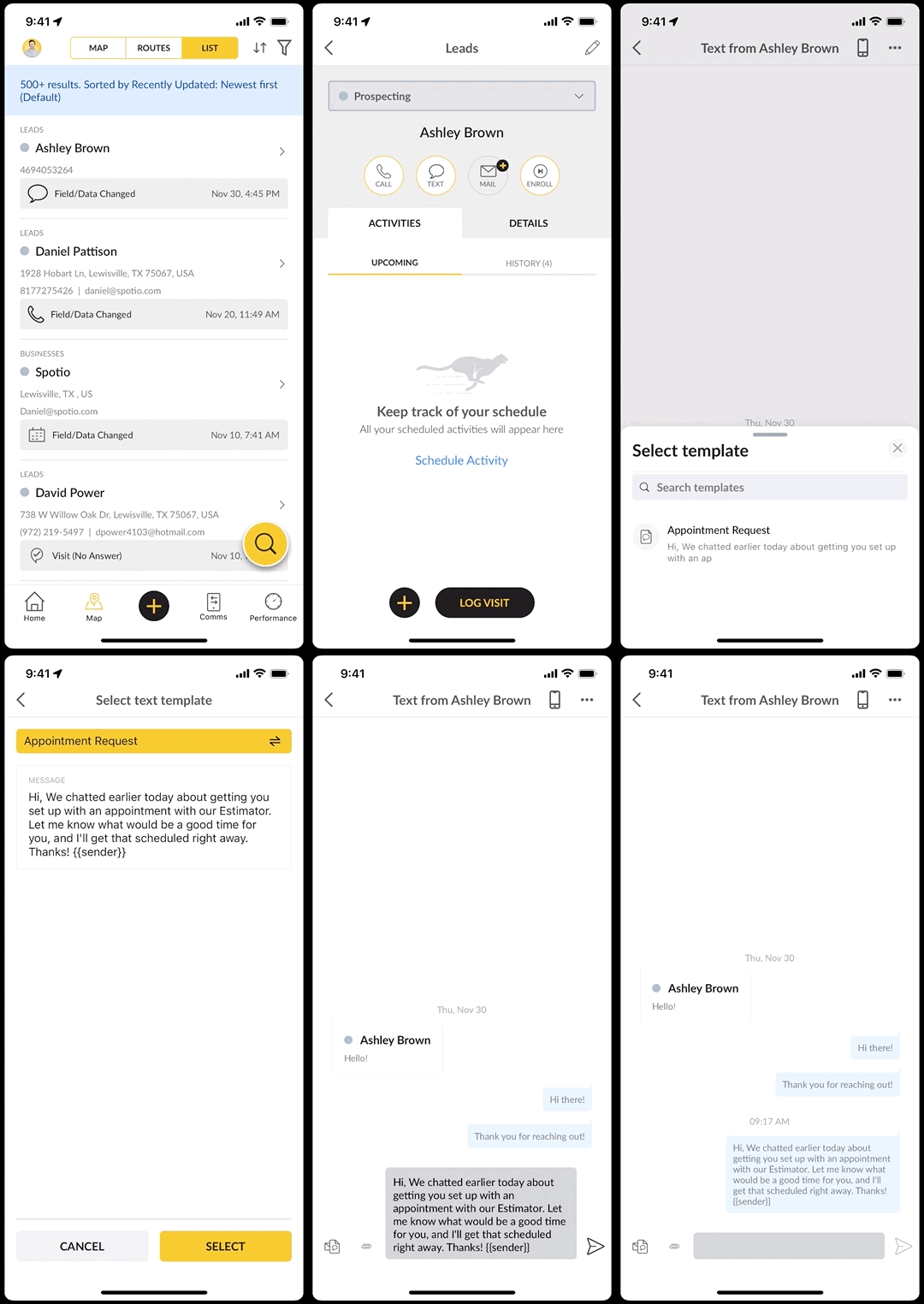
You can also use the black circle with the plus sign to send text messages as well. Select **Text Lead** and follow the above process.
### Outbound Text Templates - Web
To use a template for an outgoing text message on the web app:
1. Click the **Text** icon at the top right or the **Comms** icon on the left sidebar.
2. Select on **New Text**.
3. In the search bar, type the record's name.
4. Tap on the Record's name.
5. Click the *templates* icon in the bottom left corner.
6. Select the active template you are wanting to send.
7. Hit the *arrow* icon to complete.
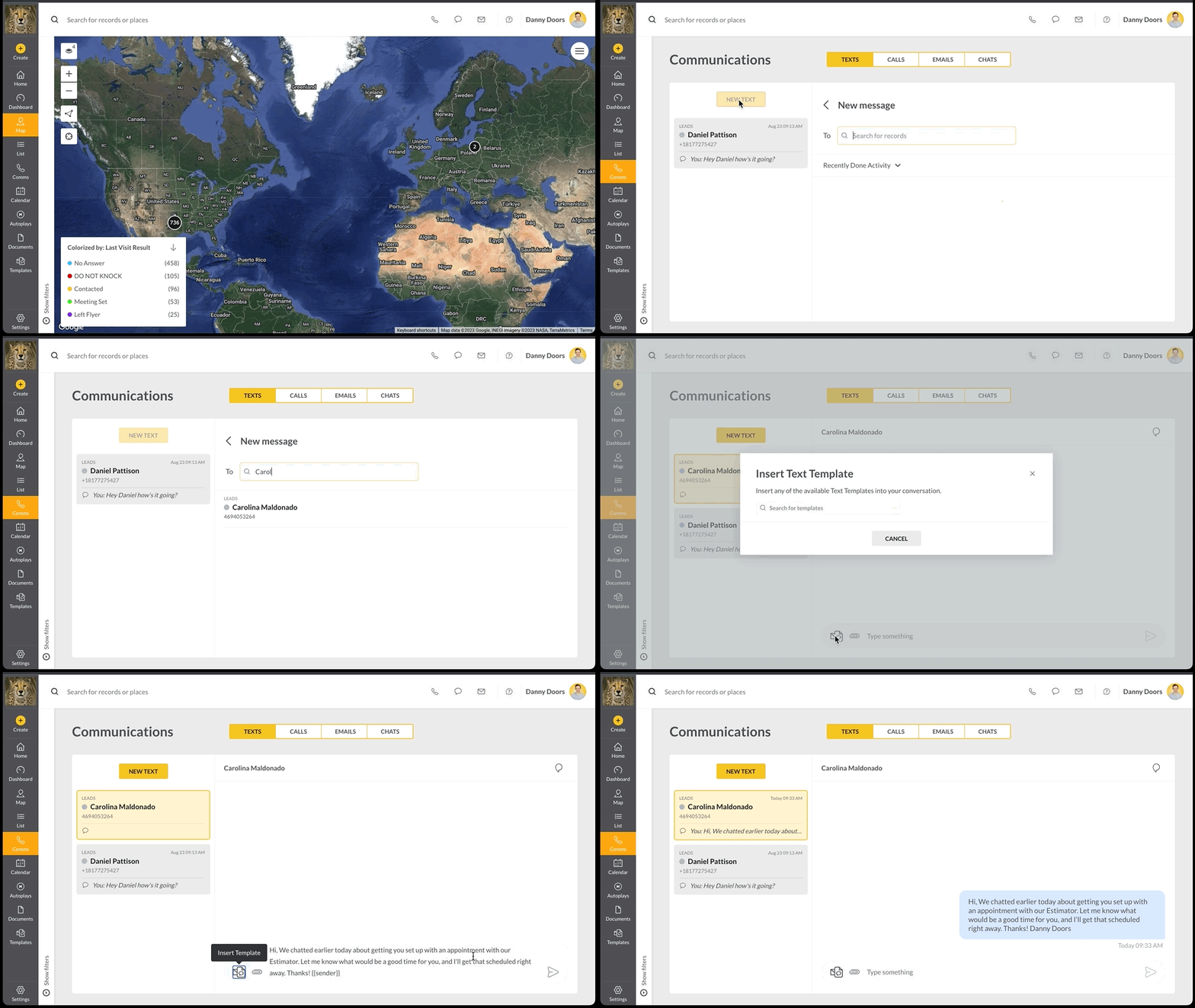
If you have already had a previous conversation with the record, you can also click on the previous recipient's message on the left side or use the search bar to continue the text thread and use templates.
### Using Email Templates
Similar to text templates, email templates can be used in both the web and mobile app for faster, more efficient communication with records. Remember to have your email integrated with SPOTIO.
### Outbound Email Templates - Mobile
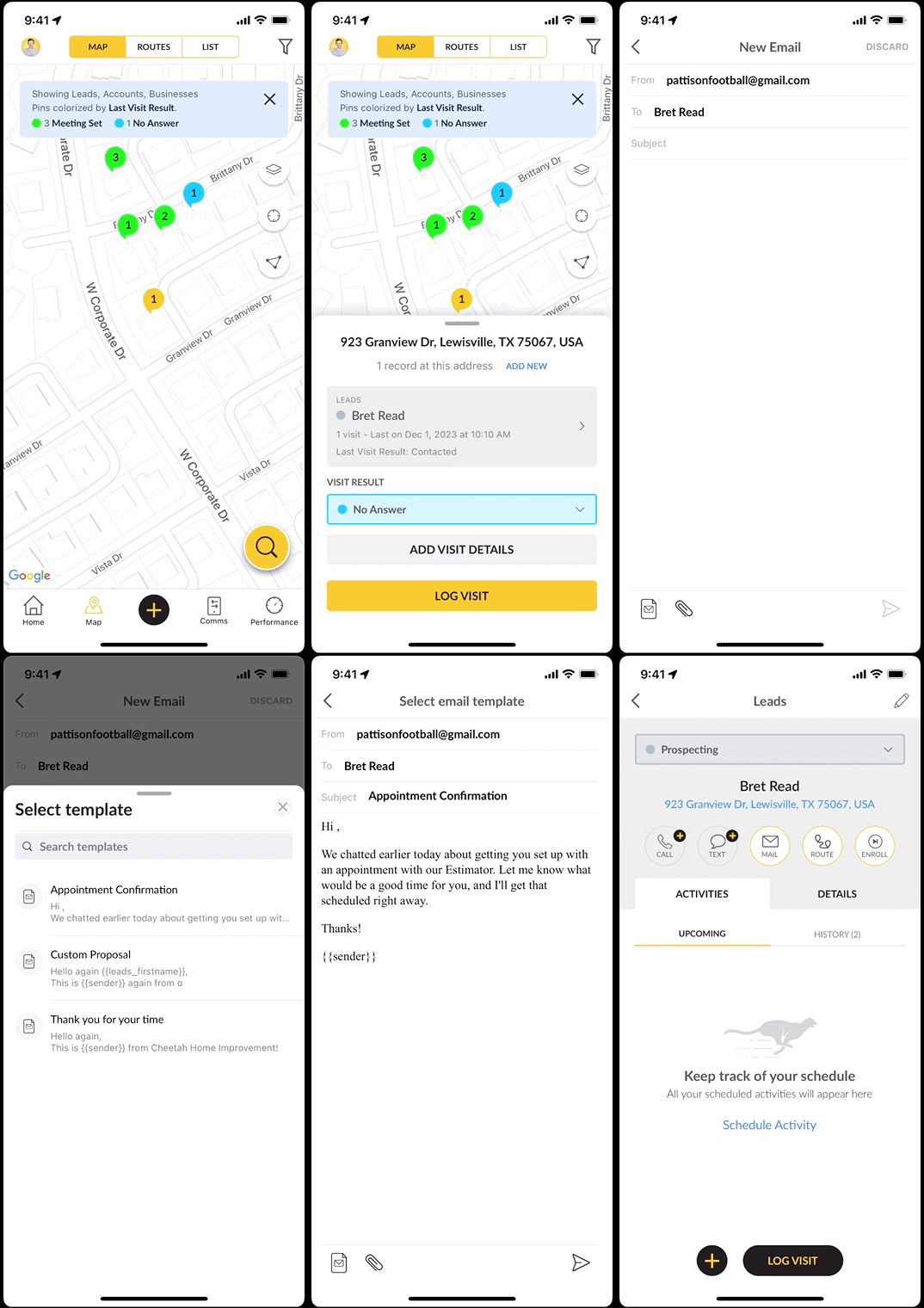
To use an email template on an outbound message on the mobile app:
1. Tap on the record to access the record details.
2. Click the **Mail** bubble icon.
3. Hit the *template* icon at the bottom left.
4. Choose an active template.
5. Click the **Select** button.
6. Tap the *arrow* icon to send.
### Outbound Email Templates - Web
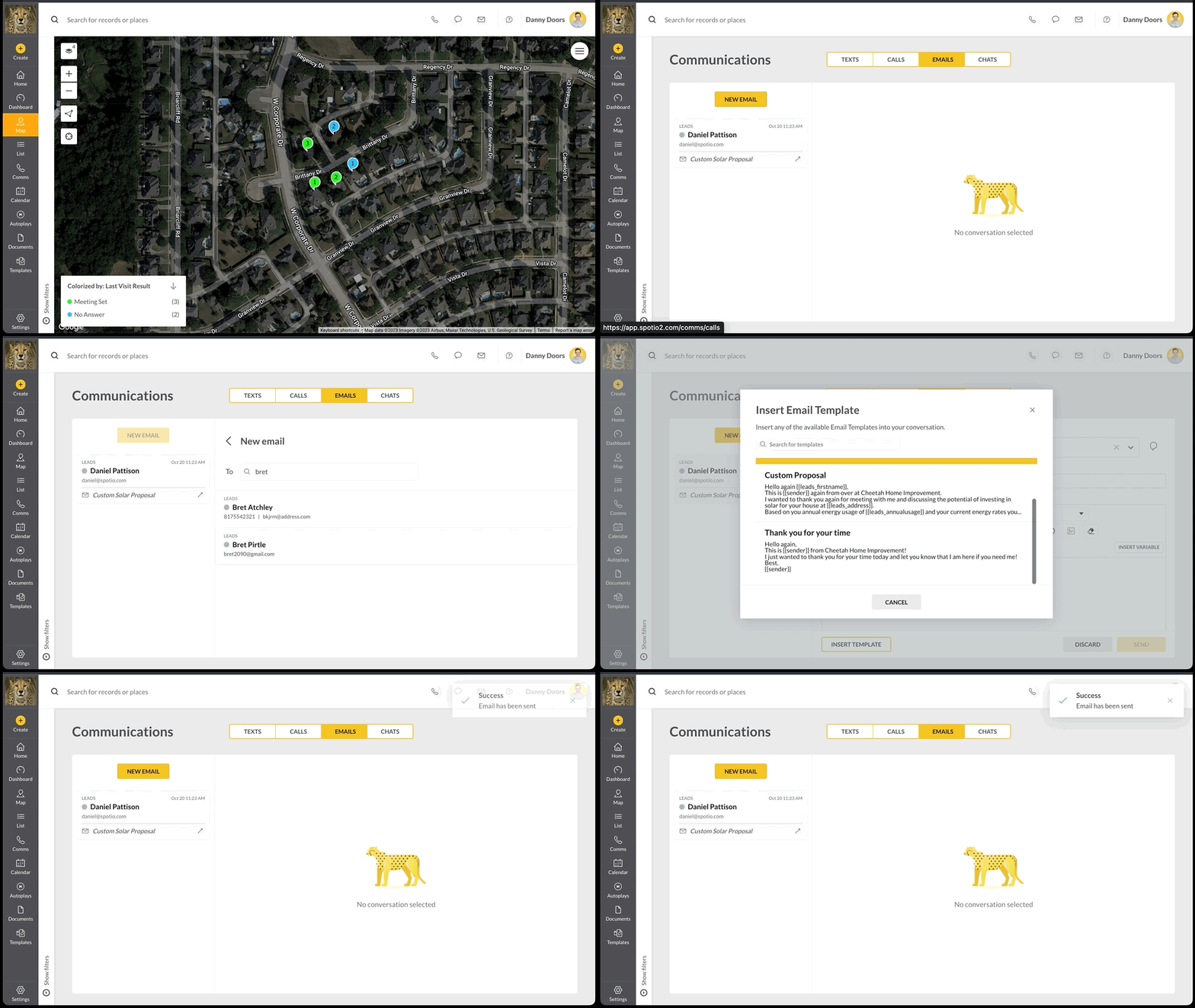
To use an email template for an outbound message on the web app:
1. Access the **Comms** icon on the left sidebar.
2. Select the **Emails** tab.
3. Click on the **New Email** button.
4. Search and select the record to email.
5. Click the **Insert Template** button.
6. Choose from the active templates.
7. Hit **Send**.
### FAQs
**Can I add attachments?**
Attachments can be added on both the web and mobile app. Simply click the paper clip icon next to the templates icon, or upload on the web app.
- [Getting started](https://support.spotio.com/getting-started?hsLang=en)
- [Troubleshooting](https://support.spotio.com/troubleshooting?hsLang=en)
- [Integrations](https://support.spotio.com/integrations?hsLang=en)
- [Knowledge Base](https://support.spotio.com/knowledge-base?hsLang=en#main-content)
- [Admin](https://support.spotio.com/knowledge-base?hsLang=en#admin)
- [Sales Rep](https://support.spotio.com/knowledge-base?hsLang=en#sales-rep)
- [Getting Started](https://support.spotio.com/knowledge-base?hsLang=en#getting-started)
- [FAQ](https://support.spotio.com/knowledge-base?hsLang=en#faq)
- [SPOTIO Español](https://support.spotio.com/knowledge-base?hsLang=en#spotio-espa%C3%B1ol)
- [SPOTIO: Troubleshooting](https://support.spotio.com/knowledge-base?hsLang=en#spotio-troubleshooting)
- [Manager](https://support.spotio.com/knowledge-base?hsLang=en#manager)
- [Getting Started: Manager](https://support.spotio.com/knowledge-base?hsLang=en#getting-started-manager)
- [Getting Started: Admin](https://support.spotio.com/knowledge-base?hsLang=en#getting-started-admin)
- [Getting Started: Sales Rep](https://support.spotio.com/knowledge-base?hsLang=en#getting-started-sales-rep)
- [Release Notes](https://support.spotio.com/release-notes?hsLang=en#main-content)
- [2025 Releases](https://support.spotio.com/release-notes?hsLang=en#2025-releases)
- [2026 Releases](https://support.spotio.com/release-notes?hsLang=en#2026-releases)
- [SPOTIO University](https://support.spotio.com/spotio-university?hsLang=en#main-content)
- [SPOTIO U: On Demand](https://support.spotio.com/spotio-university?hsLang=en#spotio-u-on-demand)
- [Live Training Sessions](https://support.spotio.com/spotio-university?hsLang=en#live-training-sessions)
- [Billing](https://support.spotio.com/billing?hsLang=en)
- [DASH](https://support.spotio.com/dash?hsLang=en)
- [Webinars: On Demand](https://support.spotio.com/webinars-on-demand?hsLang=en#main-content)
- [Feature Spotlight](https://support.spotio.com/webinars-on-demand?hsLang=en#feature-spotlight)
- [Strategy & Best Practices](https://support.spotio.com/webinars-on-demand?hsLang=en#strategy-best-practices)
- [Quick Start Guides](https://support.spotio.com/quick-start-guides?hsLang=en#main-content)
- [Quick Start Videos: Web App Setup Guides](https://support.spotio.com/quick-start-guides?hsLang=en#quick-start-videos-web-app-setup-guides)
- [Quick Start Videos: Mobile App Navigation](https://support.spotio.com/quick-start-guides?hsLang=en#quick-start-videos-mobile-app-navigation)
- [Quick Start Videos: Web App Navigation](https://support.spotio.com/quick-start-guides?hsLang=en#quick-start-videos-web-app-navigation)
[mailto:support@spotio.com](mailto:support@spotio.com)
Copyright © 2026, SPOTIO