---
title: Tasks
description: Tasks
---
[Skip to content](https://support.spotio.com/hc/en-us/articles/20590651344791-tasks#main-content)
English
Show submenu for translations
[](https://support.spotio.com?hsLang=en)
Open main navigation
Close main navigation
- English
Show submenu for translations
How can we help you?
- There are no suggestions because the search field is empty.
1. [SPOTIO Knowledge Base](https://support.spotio.com/?hsLang=en)
2. [Knowledge Base](https://support.spotio.com/knowledge-base?hsLang=en)
3. [Admin](https://support.spotio.com/knowledge-base?hsLang=en#admin)
May 21, 2026
# Tasks
Have you ever wanted to create a task for yourself or others, but not have it take up an entire block of time on your calendar? Custom tasks will allow you to do just that. In this article we will cover the creation and deployment of such tasks in your SPOTIO account.
**What is a task?**
A task is an activity you can create in your account that does not have a time duration associated with it.
**Why Tasks are Beneficial to You**
Throughout your day to day work in the field, have you ever needed to create an activity for yourself that does not require a set time on your calendar? Perhaps to remind yourself to follow up with a prospect or an account. Custom tasks will now allow you to do this with any record in your account.
**Creating Tasks in your SPOTIO Account**
Configuring custom tasks and events can only be done by an Account Admin on the web app of SPOTIO.
To configure custom tasks and events:
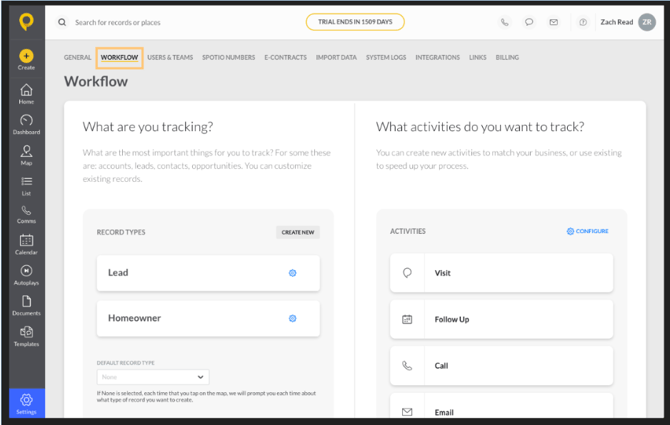
1. Tap **Settings** in the bottom left corner of your window
2. Select **Workflow**
3. Select **Configure** in the Activities section
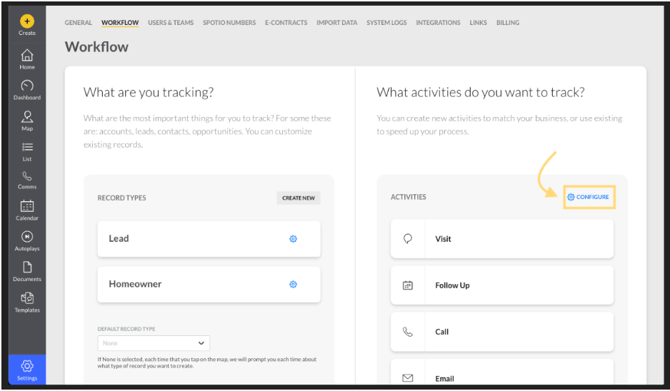
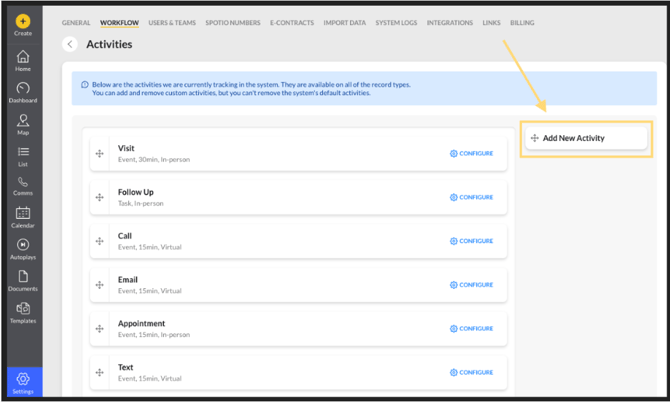
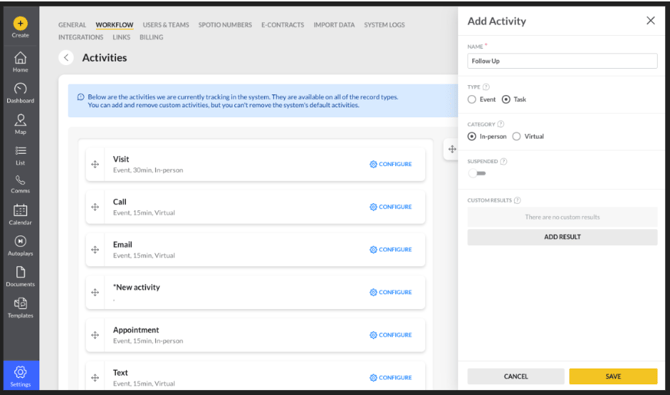
This will bring you into the Activities section. To create a new task or event, Drag the **Add New Activity** option into the current list of fields on the left. You will then see a window pop up on the far right where you can name your custom activity, and also decide what type of activity this will be - an Event or a Task. Here is where you can also determine if this custom activity is to be in person or virtual.
**Difference Between Events and Tasks**
- Event based activities will be created for a specific date and time on a users calendar and block off the amount of time specified in “Default Duration”.
- Task based activities will only require a specified Due Date to be completed by, and will not block off time on the assigned users calendar
**Virtual vs. In Person Activities**
When you are creating a task, you have the option to designate the activity as a virtual or in-person activity.
- Virtual Activities can be logged on any record, from anywhere, and will not verify the location of the user when logged.
- In person Activities can only be logged on records with an address associated with them, and will verify the users location when logged.
Important Note: The activity type cannot be changed after it has been created.
### FAQs
**How can I delete a task or event I have created?**
In order to remove a custom activity from the list, select the blue configure option, then toggle on the Suspended option.
**Who can create custom activities in an account?**
Only Account Admins have the ability to create and suspend custom activities.
- [Getting started](https://support.spotio.com/getting-started?hsLang=en)
- [Troubleshooting](https://support.spotio.com/troubleshooting?hsLang=en)
- [Integrations](https://support.spotio.com/integrations?hsLang=en)
- [Knowledge Base](https://support.spotio.com/knowledge-base?hsLang=en#main-content)
- [Admin](https://support.spotio.com/knowledge-base?hsLang=en#admin)
- [Sales Rep](https://support.spotio.com/knowledge-base?hsLang=en#sales-rep)
- [Getting Started](https://support.spotio.com/knowledge-base?hsLang=en#getting-started)
- [FAQ](https://support.spotio.com/knowledge-base?hsLang=en#faq)
- [SPOTIO Español](https://support.spotio.com/knowledge-base?hsLang=en#spotio-espa%C3%B1ol)
- [SPOTIO: Troubleshooting](https://support.spotio.com/knowledge-base?hsLang=en#spotio-troubleshooting)
- [Manager](https://support.spotio.com/knowledge-base?hsLang=en#manager)
- [Getting Started: Manager](https://support.spotio.com/knowledge-base?hsLang=en#getting-started-manager)
- [Getting Started: Admin](https://support.spotio.com/knowledge-base?hsLang=en#getting-started-admin)
- [Getting Started: Sales Rep](https://support.spotio.com/knowledge-base?hsLang=en#getting-started-sales-rep)
- [Giving SPOTIO Reviews](https://support.spotio.com/knowledge-base?hsLang=en#giving-spotio-reviews)
- [Release Notes](https://support.spotio.com/release-notes?hsLang=en#main-content)
- [2025 Releases](https://support.spotio.com/release-notes?hsLang=en#2025-releases)
- [2026 Releases](https://support.spotio.com/release-notes?hsLang=en#2026-releases)
- [SPOTIO University](https://support.spotio.com/spotio-university?hsLang=en#main-content)
- [SPOTIO U: On Demand](https://support.spotio.com/spotio-university?hsLang=en#spotio-u-on-demand)
- [Live Training Sessions](https://support.spotio.com/spotio-university?hsLang=en#live-training-sessions)
- [Billing](https://support.spotio.com/billing?hsLang=en)
- [Webinars: On Demand](https://support.spotio.com/webinars-on-demand?hsLang=en#main-content)
- [Feature Spotlight](https://support.spotio.com/webinars-on-demand?hsLang=en#feature-spotlight)
- [Strategy & Best Practices](https://support.spotio.com/webinars-on-demand?hsLang=en#strategy-best-practices)
- [Quick Start Guides](https://support.spotio.com/quick-start-guides?hsLang=en#main-content)
- [Quick Start Videos: Web App Setup Guides](https://support.spotio.com/quick-start-guides?hsLang=en#quick-start-videos-web-app-setup-guides)
- [Quick Start Videos: Mobile App Navigation](https://support.spotio.com/quick-start-guides?hsLang=en#quick-start-videos-mobile-app-navigation)
- [Quick Start Videos: Web App Navigation](https://support.spotio.com/quick-start-guides?hsLang=en#quick-start-videos-web-app-navigation)
[mailto:support@spotio.com](mailto:support@spotio.com)
Copyright © 2026, SPOTIO