---
title: Manual Call Logging on Mobile
description: Manual Call Logging on Mobile
---
[Skip to content](https://support.spotio.com/hc/en-us/articles/20590885415319-manual-call-logging-on-mobile#main-content)
English
Show submenu for translations
[](https://support.spotio.com?hsLang=en)
Open main navigation
Close main navigation
- English
Show submenu for translations
How can we help you?
- There are no suggestions because the search field is empty.
1. [SPOTIO Knowledge Base](https://support.spotio.com/?hsLang=en)
2. [Knowledge Base](https://support.spotio.com/knowledge-base?hsLang=en)
3. [Sales Rep](https://support.spotio.com/knowledge-base?hsLang=en#sales-rep)
May 20, 2026
# Manual Call Logging on Mobile
Struggling with manual call tracking in SPOTIO? Worry no more! Our latest feature allows you to log call activities instantly, even without the engagement bundle for automatic logging or a SPOTIO-assigned number. This guide will walk you through the simple steps to make your call logging process as efficient as possible.
*Note: This feature is available for SPOTIO users without a SPOTIO phone number. For information on call logging with SPOTIO numbers enabled, find our article* [*here*](https://support.spotio.com/hc/en-us/articles/360057363233-MultiChannel-Communication-Emails-Calls-Texts?hsLang=en)*.*
### How to Log a Call from SPOTIO
Step 1: Initiating the Call
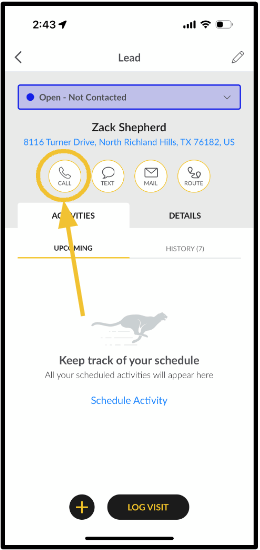
- Navigate to a Record: Open the record of the contact you wish to call.
- Click on **Call**: Ensure that the contact's phone number is saved. If not, SPOTIO will prompt you to add a number before proceeding.
Step 2: Making the Call
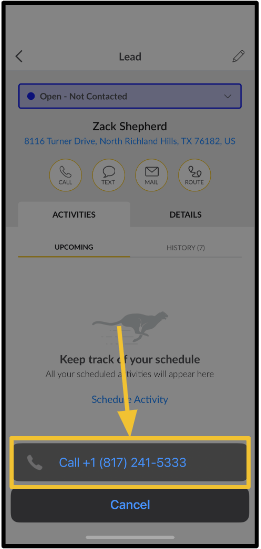
- Place the Call: Once you click **Call**, click on the phone number displayed at the bottom.
- Your device's native calling app will be used to place the call.
Step 3: Select the Call Result
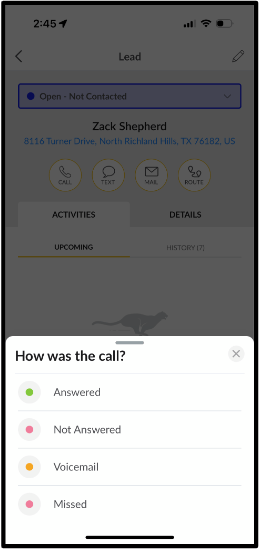
- Return to SPOTIO: After completing the call, **switch back to the SPOTIO app**.
- Input Call Details: You'll be presented with a "How was the Call?" screen. Here, you can select the **call result**.
Step 4: Log the Call
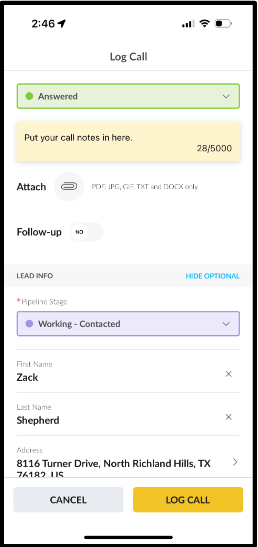
- On the next screen you can enter **notes** from the call or **attach documents,** schedule a **Follow Up** activity**,** adjust **Pipeline Stages,** and **edit** any information in fields.
- Once you have made your edits and added your notes, attachments, and scheduled your Follow Up activity, Click **Log Call.**
- Review Your Log: The call will automatically be logged in the Activity history along with any notes or attachments you added.
- [Getting started](https://support.spotio.com/getting-started?hsLang=en)
- [Troubleshooting](https://support.spotio.com/troubleshooting?hsLang=en)
- [Integrations](https://support.spotio.com/integrations?hsLang=en)
- [Knowledge Base](https://support.spotio.com/knowledge-base?hsLang=en#main-content)
- [Admin](https://support.spotio.com/knowledge-base?hsLang=en#admin)
- [Sales Rep](https://support.spotio.com/knowledge-base?hsLang=en#sales-rep)
- [Getting Started](https://support.spotio.com/knowledge-base?hsLang=en#getting-started)
- [FAQ](https://support.spotio.com/knowledge-base?hsLang=en#faq)
- [SPOTIO Español](https://support.spotio.com/knowledge-base?hsLang=en#spotio-espa%C3%B1ol)
- [SPOTIO: Troubleshooting](https://support.spotio.com/knowledge-base?hsLang=en#spotio-troubleshooting)
- [Manager](https://support.spotio.com/knowledge-base?hsLang=en#manager)
- [Getting Started: Manager](https://support.spotio.com/knowledge-base?hsLang=en#getting-started-manager)
- [Getting Started: Admin](https://support.spotio.com/knowledge-base?hsLang=en#getting-started-admin)
- [Getting Started: Sales Rep](https://support.spotio.com/knowledge-base?hsLang=en#getting-started-sales-rep)
- [Giving SPOTIO Reviews](https://support.spotio.com/knowledge-base?hsLang=en#giving-spotio-reviews)
- [Release Notes](https://support.spotio.com/release-notes?hsLang=en#main-content)
- [2025 Releases](https://support.spotio.com/release-notes?hsLang=en#2025-releases)
- [2026 Releases](https://support.spotio.com/release-notes?hsLang=en#2026-releases)
- [SPOTIO University](https://support.spotio.com/spotio-university?hsLang=en#main-content)
- [SPOTIO U: On Demand](https://support.spotio.com/spotio-university?hsLang=en#spotio-u-on-demand)
- [Live Training Sessions](https://support.spotio.com/spotio-university?hsLang=en#live-training-sessions)
- [Billing](https://support.spotio.com/billing?hsLang=en)
- [Webinars: On Demand](https://support.spotio.com/webinars-on-demand?hsLang=en#main-content)
- [Feature Spotlight](https://support.spotio.com/webinars-on-demand?hsLang=en#feature-spotlight)
- [Strategy & Best Practices](https://support.spotio.com/webinars-on-demand?hsLang=en#strategy-best-practices)
- [Quick Start Guides](https://support.spotio.com/quick-start-guides?hsLang=en#main-content)
- [Quick Start Videos: Web App Setup Guides](https://support.spotio.com/quick-start-guides?hsLang=en#quick-start-videos-web-app-setup-guides)
- [Quick Start Videos: Mobile App Navigation](https://support.spotio.com/quick-start-guides?hsLang=en#quick-start-videos-mobile-app-navigation)
- [Quick Start Videos: Web App Navigation](https://support.spotio.com/quick-start-guides?hsLang=en#quick-start-videos-web-app-navigation)
[mailto:support@spotio.com](mailto:support@spotio.com)
Copyright © 2026, SPOTIO