---
title: Business Profile Registration
description: Business Profile Registration
---
[Skip to content](https://support.spotio.com/hc/en-us/articles/21692473641367-business-profile-registration#main-content)
English
Show submenu for translations
[](https://support.spotio.com?hsLang=en)
Open main navigation
Close main navigation
- English
Show submenu for translations
How can we help you?
- There are no suggestions because the search field is empty.
1. [SPOTIO Knowledge Base](https://support.spotio.com/?hsLang=en)
2. [Knowledge Base](https://support.spotio.com/knowledge-base?hsLang=en)
3. [Admin](https://support.spotio.com/knowledge-base?hsLang=en#admin)
July 29, 2026
# Business Profile Registration
[Due to recent regulatory and industry](https://help.twilio.com/articles/4408675845019-SMS-Compliance-and-A2P-10DLC-in-the-US)[updates](https://support.twilio.com/hc/en-us/articles/4408675845019-SMS-Compliance-and-A2P-10DLC-in-the-US) to improve trust around the use of application-to-person (A2P) SMS messaging, SPOTIO users leveraging SMS messaging are required to register a Business Profile for A2P 10DLC to be able to send text messages. This is required by all major U.S. telecommunications carriers and is not specific to SPOTIO or our voice and messaging provider, Twilio.
***Beginning July 5, 2023, all SMS messages sent to U.S. phone numbers using 10DLC phone numbers—i.e., 10 digit US phone numbers such as (555) 555-5555—must be sent via a registered application-to-person (A2P) campaign.***
***If you send messages without registering after July 5, 2023, they will be subject to a gradual increase of message blocking, ultimately leading to a full block of all U.S.-bound messages sent after August 31, 2023.***
### Before you begin
Some requirements to consider before beginning this process:
1. Your organization must be a registered business with a Tax ID/EIN.
2. You must be able to show through a publicly verifiable source that your authorized representative is an employee of your organization. (E.g., Business social media account, government website, company website, etc.)
3. Your organization must have some type of opt-in consent that SMS recipients register with before receiving messages. [See here for guidance.](https://support.spotio.com/hc/en-us/articles/21692473641367-business-profile-registration#h_01HQRT9KKSAQJ5Y1BPDPGYB4C1)
### How to Register a Business Profile
### Registration Steps
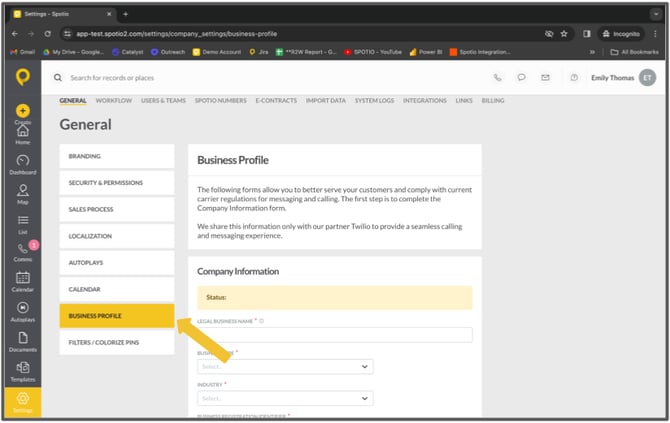
There are 2 required steps you will need to take. These steps are to be completed in the SPOTIO web browser **Settings \> General \> Business Profile**
****
*\* Approval after the Business Profile and Campaign are submitted can take 4-6 weeks, pending no modifications need to be made\**
1. **Create** [Business Profile](https://support.spotio.com/hc/en-us/articles/21692473641367-business-profile-registration#h_01HQRVWBZV1BJ2PVQQS7Q7F407)
2. **Create a** [Text Campaign](https://support.spotio.com/hc/en-us/articles/21692473641367-business-profile-registration#h_01HQRVYKBN8SQ6C94WPB200BG5)
**Each step requires approval by our voice and messaging provider, Twilio. For updates on approval status, please check the SPOTIO Business Profile page periodically.**
### Business Profile
Start by navigating to your User menu from the Admin Settings.
1. Click on **Settings**.
2. Click on **General**.
3. Click on **Business Profile.**
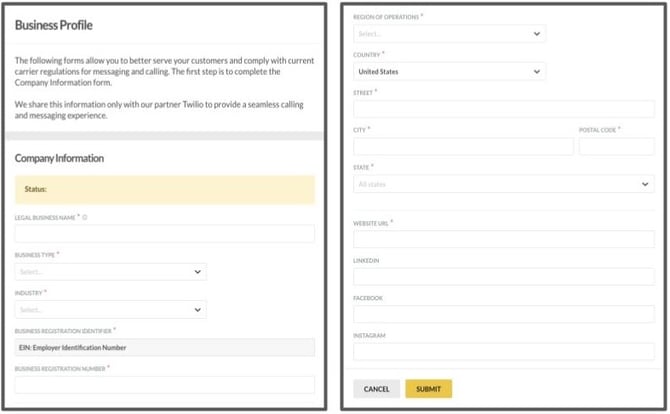
4. From the *Business Profile* tab fill in the **Business Profile** form
5. Click **Submit**
### Required Information
The required information below can be gathered and documented in any way that will make it convenient for you to reference and input (e.g., copy-paste) into a web form. You do *not* have to compose formal documents for submission, but ALL information is required. Please review the examples provided.
- Business Name
- Physical Address (Street, City, State/Province/Region, Postal Code, Country)
- Business Type (Sole Proprietorship/Partnership/Corporation /Co-Operative/LLC/Non-Profit)
- Business Registration Number and Type **\******MUST MATCH YOUR LEGAL BUSINESS NAME\****
- For A2P 10DLC registration, you must provide your Tax ID / EIN
- Industry
- Regions of Operations
- Website
### Text Messaging Campaign (A2P)
1\. **Campaign Type**
Select the campaign type that best fits your business needs and how you will be communicating with your customers. Your options include:
- **Customer Care:** Support, account management, and other avenues of customer interaction
- **Marketing:** Promotional content i.e: sales and limited-time offers
- **Mixed:** A campaign that covers multiple use cases, such as Customer Care and Marketing
.jpg?width=670&height=377&name=A2P%20Pics%20(1).jpg)
#### 2**. Registration Opt-In Type**
- **Text-to-Join (Recommended)**
- **Other**
**Text-to-Join**
If you select the *Text-to-join* option, SPOTIO automatically fills in the ***How do end-users consent to receive messages*** and ***Opt-In message*** portion of the form for you. We will use the standard consent message while customizing the *Opt-In* message to include your company name.
You will need to fill in the [*Campaign Description*](https://support.spotio.com/hc/en-us/articles/21692473641367-business-profile-registration#h_01HRA6TKFJ9HK36X2D4M5J3JXS)for your company campaign, more information about the campaign description is below.
**Other**
If you select the *Other* option you will need to provide and describe your own ***Opt-In*** system. You will need to fill out these portions of the form:
- [Campaign Description](https://support.spotio.com/hc/en-us/articles/21692473641367-business-profile-registration#h_01HRA6TKFJ9HK36X2D4M5J3JXS)
- [How do end-users consent to receive messages?](https://support.spotio.com/hc/en-us/articles/21692473641367-business-profile-registration#h_01HQRT9KKSYNTGX9W77Z98BG6Q)
- [Opt-in Message](https://support.spotio.com/hc/en-us/articles/21692473641367-business-profile-registration#h_01HQRT9KKSAQJ5Y1BPDPGYB4C1)
- [Sample Messages](https://support.spotio.com/hc/en-us/articles/21692473641367-business-profile-registration#h_01HQRT9KKSW0TKKD4KWNE4PEMX)
**SMS Opt-in Guidance**
An example of an opt-in system could be a website where prospective customers sign up to receive messages. A comprehensive opt-in solution should contain the following:
- Program name and/or a description of the messages that will be sent
- Organization or individual being represented in the initial message
- Fee disclosure (e.g. "Message and data rates may apply")
- Service delivery frequency or recurring messages disclosure (e.g. "Message frequency varies")
- Customer care information contact information.
- Opt-out instructions (typically "Text STOP to cancel")
- Link to Privacy Policy describing how end-user opt-in information will be used
- Link to Terms and Conditions describing terms of service
- *A checkbox option that end-users must select in order to receive SMS messaging. The checkbox can not be pre-selected. The checkbox provides the end-user the ability to agree, or not agree, to receive SMS messaging.*
Please refer to the [CTIA guidelines](https://api.ctia.org/wp-content/uploads/2019/07/190719-CTIA-Messaging-Principles-and-Best-Practices-FINAL.pdf) or [A2P 10DLC Campaign Approval Requirements](https://help.twilio.com/articles/11847054539547-A2P-10DLC-Campaign-Approval-Requirements) for detailed instructions and best practices on handling consumer consent. Please consult with your legal advisors as required on fulfilling the requirements as they apply to your use case and organization.
#### .jpg?width=670&height=377&name=A2P%20Pics%20(2).jpg)
#### **Campaign Description**
In the campaign description section, this is where you will describe what you will be using the campaign for. The reason could be messages notifying your customers when installation will begin along with updates throughout the process. Or sharing when your company is having a promotion on a product you are selling.
***Pro Tip:*** If you are using texting for mixed messaging please include a description for both customer care and promotional campaigns.
| **Examples** |
| --- |
| **GOOD**: This campaign sends messages to customers who have signed up using our website *\[link to website\]* requesting to receive additional information about our new product line. We use these messages to help determine customer availability to have a phone call. |
| **POOR**: This campaign sends messages to customers to help schedule phone calls to discuss our new product line. |
#### 3. **How do end-users consent to receive messages?**
Describe how and when consumers opt-in to the campaign, therefore giving consent to the sender to receive their messages.
The call-to-action must be explicitly clear and inform consumers of the nature of the program.
If multiple opt-in methods can be used for the same, list them all.
Be sure to:
- Provide a website where opt-in occurs.
- List all opt-in methods.
- Ensure any provided website is accessible, with a privacy policy and terms.
***Tip:*** If *where* and *how* the customer provides opt-in is unclear, the campaign will be rejected.
| **Examples** |
| --- |
| **GOOD**: Customers provide opt-in specifically when enrolling into our website or in person by requesting SMS capabilities within the store. Opt-in during website registration is a self-service process and occurs at acme.com/signup. By submitting, you authorize ACME to send text messages with offers and other information. Message/data rates apply. Consent is not a condition of purchase. *\[Link to terms and conditions\]* |
| **POOR**: Customers sign up. |
#### 4. **Opt-In Message**
If the ***Text-to-join*** option is selected this field will be auto-populated for you.
If the ***Other*** option is selected, give a preview of what the ***Opt-In*** message will look like.
***Pro Tip*****:** Make sure to include a way for customers to get help and how they opt-out.
.jpg?width=670&height=377&name=A2P%20Pics%20(3).jpg)
#### 5. **Sample Messages**
Two (2) *sample messages* are required.
Sample messages should reflect actual messages to be sent under the campaign.
Guidelines for composing sample messages:
- Do not use placeholder text for your sample messages.
- Use brackets to indicate templated fields in the sample message.
- Be consistent in sample message, use case, and campaign description.
- Provide Opt-out when applicable.
.jpg?width=670&height=377&name=A2P%20Pics%20(4).jpg)
### Additional Campaign Guidance
Additional guidance and best practices can be found in [Twilio's *A2P Campaign Approval Best Practices*](https://support.twilio.com/hc/en-us/articles/11847054539547-A2P-10DLC-Campaign-Approval-Best-Practices).
### FAQs
**Do customers have to re-submit new company information and A2P campaigns if they have already been approved?**
No, you will not have to reregister and start the process over. Your team will need to adopt the new opt-in process SPOTIO has created.
**Is A2p 10DLC applicable in other countries?**
No, currently A2P 10DL only applies to the U.S. and Canada.
- [Getting started](https://support.spotio.com/getting-started?hsLang=en)
- [Troubleshooting](https://support.spotio.com/troubleshooting?hsLang=en)
- [Integrations](https://support.spotio.com/integrations?hsLang=en)
- [Knowledge Base](https://support.spotio.com/knowledge-base?hsLang=en#main-content)
- [Admin](https://support.spotio.com/knowledge-base?hsLang=en#admin)
- [Sales Rep](https://support.spotio.com/knowledge-base?hsLang=en#sales-rep)
- [Getting Started](https://support.spotio.com/knowledge-base?hsLang=en#getting-started)
- [FAQ](https://support.spotio.com/knowledge-base?hsLang=en#faq)
- [SPOTIO Español](https://support.spotio.com/knowledge-base?hsLang=en#spotio-espa%C3%B1ol)
- [SPOTIO: Troubleshooting](https://support.spotio.com/knowledge-base?hsLang=en#spotio-troubleshooting)
- [Manager](https://support.spotio.com/knowledge-base?hsLang=en#manager)
- [Getting Started: Manager](https://support.spotio.com/knowledge-base?hsLang=en#getting-started-manager)
- [Getting Started: Admin](https://support.spotio.com/knowledge-base?hsLang=en#getting-started-admin)
- [Getting Started: Sales Rep](https://support.spotio.com/knowledge-base?hsLang=en#getting-started-sales-rep)
- [Giving SPOTIO Reviews](https://support.spotio.com/knowledge-base?hsLang=en#giving-spotio-reviews)
- [Release Notes](https://support.spotio.com/release-notes?hsLang=en#main-content)
- [2025 Releases](https://support.spotio.com/release-notes?hsLang=en#2025-releases)
- [2026 Releases](https://support.spotio.com/release-notes?hsLang=en#2026-releases)
- [SPOTIO University](https://support.spotio.com/spotio-university?hsLang=en#main-content)
- [SPOTIO U: On Demand](https://support.spotio.com/spotio-university?hsLang=en#spotio-u-on-demand)
- [Live Training Sessions](https://support.spotio.com/spotio-university?hsLang=en#live-training-sessions)
- [Billing](https://support.spotio.com/billing?hsLang=en)
- [Webinars: On Demand](https://support.spotio.com/webinars-on-demand?hsLang=en#main-content)
- [Feature Spotlight](https://support.spotio.com/webinars-on-demand?hsLang=en#feature-spotlight)
- [Strategy & Best Practices](https://support.spotio.com/webinars-on-demand?hsLang=en#strategy-best-practices)
- [Quick Start Guides](https://support.spotio.com/quick-start-guides?hsLang=en#main-content)
- [Quick Start Videos: Web App Setup Guides](https://support.spotio.com/quick-start-guides?hsLang=en#quick-start-videos-web-app-setup-guides)
- [Quick Start Videos: Mobile App Navigation](https://support.spotio.com/quick-start-guides?hsLang=en#quick-start-videos-mobile-app-navigation)
- [Quick Start Videos: Web App Navigation](https://support.spotio.com/quick-start-guides?hsLang=en#quick-start-videos-web-app-navigation)
[mailto:support@spotio.com](mailto:support@spotio.com)
Copyright © 2026, SPOTIO