---
title: How to Use Layers
description: How to Use Layers
---
[Skip to content](https://support.spotio.com/hc/en-us/articles/360018540694-how-to-use-layers#main-content)
English
Show submenu for translations
[](https://support.spotio.com?hsLang=en)
Open main navigation
Close main navigation
- English
Show submenu for translations
How can we help you?
- There are no suggestions because the search field is empty.
1. [SPOTIO Knowledge Base](https://support.spotio.com/?hsLang=en)
2. [Knowledge Base](https://support.spotio.com/knowledge-base?hsLang=en)
3. [Manager](https://support.spotio.com/knowledge-base?hsLang=en#manager)
May 21, 2026
# How to Use Layers
SPOTIO Layers provide users with a dynamic way to visualize and manage various data layers on their map, enhancing the overall navigation. By leveraging this feature, users can customize their view with overlays, territories, and data points, making it easier to strategize and optimize their field operations.
### Layer Options
**Active Records** will be the records that are currently housed in the active records stages of the pipeline. This could be records your team is actively pursuing and can vary depending on your account’s setup. Toggling this off will remove these records from the map view.
**Closed Records** will be records that have been moved into a stage in the Won or Lost Records columns on the pipeline. These records may have become a signed deal or lost for the time being. It should be records that your team is not actively pursuing at the moment to close. Toggling off will remove these records from the map view.
**Territories** will color the geographical areas on the map. You may need to zoom in or out to see the territory based on the size.
**Team** will allow you to see other sales reps’ location on the map view. Their visibility will depend on what permissions they gave SPOTIO when downloading the app, as well as what hours they have set to share their location. Within this section, you will have a box displaying whether your Location Sharing is On or Off. You can read more in the [Working Hours](https://support.spotio.com/hc/en-us/articles/20590725709847-Working-Hours?hsLang=en) knowledge base article.
**Satellite Map** will turn the gray mode map screen to a satellite view. These images show landscape photos from an aerial view.
**KML** will display overlays on the map view. Data is not display or imported.
**Hailtrace** will be an overlay of the storm swatch. This is used in connection with the HailTrace icon on the right hand side of the map view once integrated. You can learn more in [SPOTIO Native Integrations - HailTrace](https://support.spotio.com/hc/en-us/articles/9780974346647-SPOTIO-Native-Integrations-HailTrace?hsLang=en) knowledge base article.
**GPS Trails** (viewable to Admins and Managers only) will display paths taken by a rep based on GPS pings. You can read more about this feature in our [GPS Trails](https://support.spotio.com/hc/en-us/articles/360058754913-GPS-Trails?hsLang=en) knowledge base article.
### Web
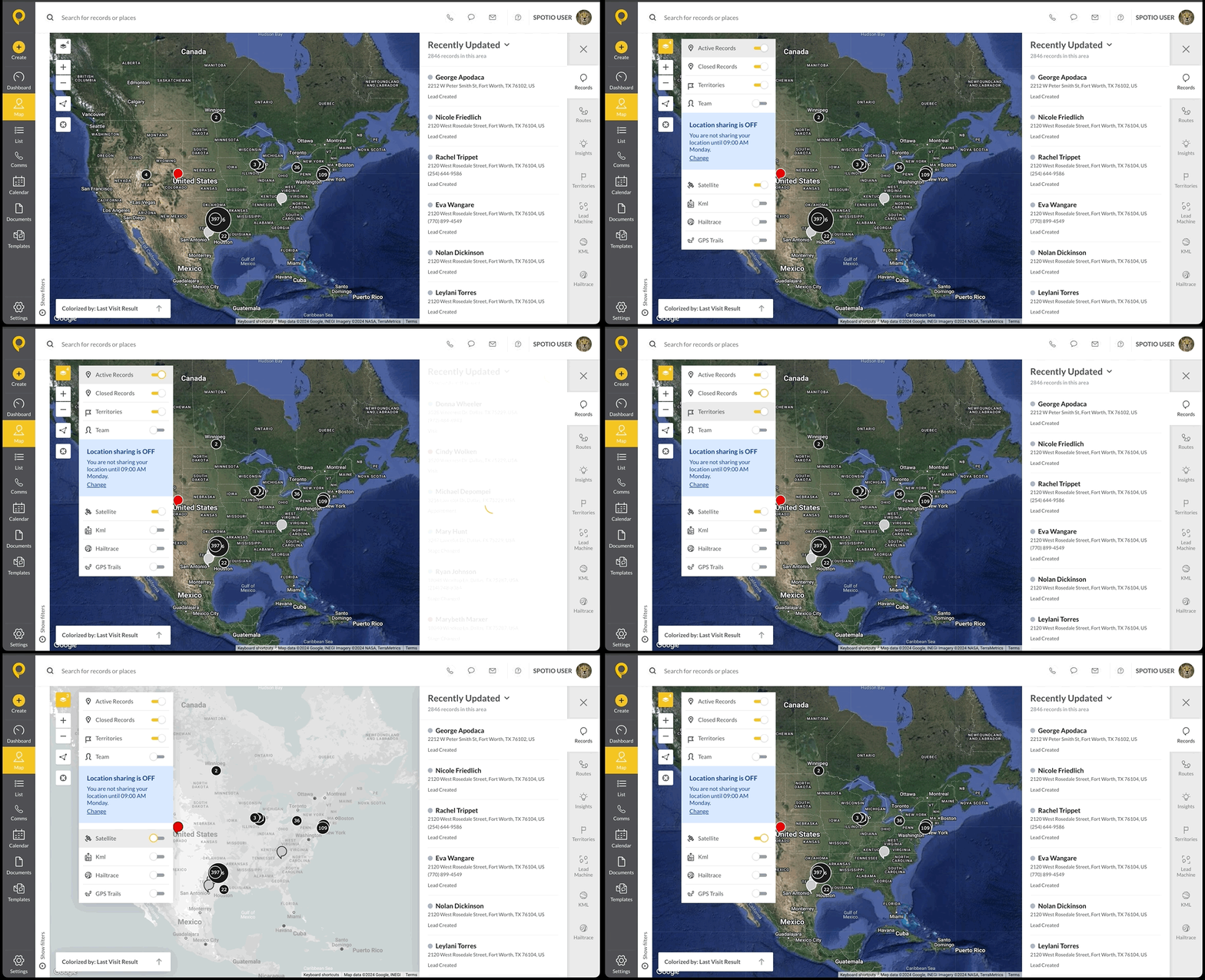
On the web app, the layers icon will appear in the top left hand corner of the map view. When tapped, a pop up screen will appear to the right of the layers tab with the ability to toggle on options.
Those options are:
- Active Records
- Closed Records
- Territories
- Team
- Satellite
- KML
- HailTrace (if integrated)
- GPS Trails
### Mobile
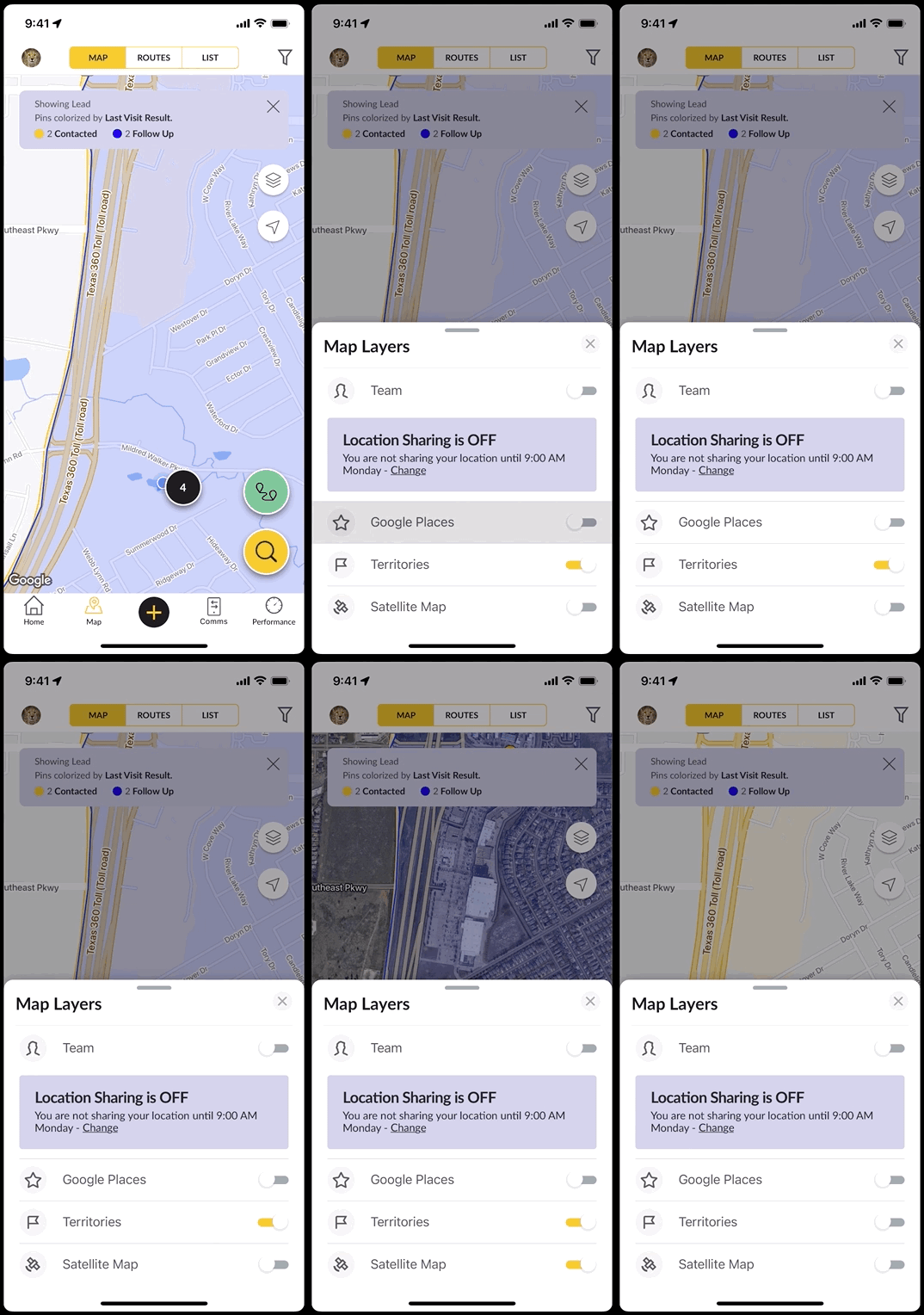
On the mobile app, the layers icon will appear in the top right hand corner of the map view. When tapped, a pop up screen will appear from the bottom with the ability to toggle on options.
Those options are:
- Team
- Google Places
- Territories
- Satellite Map
- [Getting started](https://support.spotio.com/getting-started?hsLang=en)
- [Troubleshooting](https://support.spotio.com/troubleshooting?hsLang=en)
- [Integrations](https://support.spotio.com/integrations?hsLang=en)
- [Knowledge Base](https://support.spotio.com/knowledge-base?hsLang=en#main-content)
- [Admin](https://support.spotio.com/knowledge-base?hsLang=en#admin)
- [Sales Rep](https://support.spotio.com/knowledge-base?hsLang=en#sales-rep)
- [Getting Started](https://support.spotio.com/knowledge-base?hsLang=en#getting-started)
- [FAQ](https://support.spotio.com/knowledge-base?hsLang=en#faq)
- [SPOTIO Español](https://support.spotio.com/knowledge-base?hsLang=en#spotio-espa%C3%B1ol)
- [SPOTIO: Troubleshooting](https://support.spotio.com/knowledge-base?hsLang=en#spotio-troubleshooting)
- [Manager](https://support.spotio.com/knowledge-base?hsLang=en#manager)
- [Getting Started: Manager](https://support.spotio.com/knowledge-base?hsLang=en#getting-started-manager)
- [Getting Started: Admin](https://support.spotio.com/knowledge-base?hsLang=en#getting-started-admin)
- [Getting Started: Sales Rep](https://support.spotio.com/knowledge-base?hsLang=en#getting-started-sales-rep)
- [Giving SPOTIO Reviews](https://support.spotio.com/knowledge-base?hsLang=en#giving-spotio-reviews)
- [Release Notes](https://support.spotio.com/release-notes?hsLang=en#main-content)
- [2025 Releases](https://support.spotio.com/release-notes?hsLang=en#2025-releases)
- [2026 Releases](https://support.spotio.com/release-notes?hsLang=en#2026-releases)
- [SPOTIO University](https://support.spotio.com/spotio-university?hsLang=en#main-content)
- [SPOTIO U: On Demand](https://support.spotio.com/spotio-university?hsLang=en#spotio-u-on-demand)
- [Live Training Sessions](https://support.spotio.com/spotio-university?hsLang=en#live-training-sessions)
- [Billing](https://support.spotio.com/billing?hsLang=en)
- [DASH](https://support.spotio.com/dash?hsLang=en)
- [Webinars: On Demand](https://support.spotio.com/webinars-on-demand?hsLang=en#main-content)
- [Feature Spotlight](https://support.spotio.com/webinars-on-demand?hsLang=en#feature-spotlight)
- [Strategy & Best Practices](https://support.spotio.com/webinars-on-demand?hsLang=en#strategy-best-practices)
- [Quick Start Guides](https://support.spotio.com/quick-start-guides?hsLang=en#main-content)
- [Quick Start Videos: Web App Setup Guides](https://support.spotio.com/quick-start-guides?hsLang=en#quick-start-videos-web-app-setup-guides)
- [Quick Start Videos: Mobile App Navigation](https://support.spotio.com/quick-start-guides?hsLang=en#quick-start-videos-mobile-app-navigation)
- [Quick Start Videos: Web App Navigation](https://support.spotio.com/quick-start-guides?hsLang=en#quick-start-videos-web-app-navigation)
[mailto:support@spotio.com](mailto:support@spotio.com)
Copyright © 2026, SPOTIO