---
title: "Mobile App: How to Change Layer Views on the Mobile App"
description: "Mobile App: How to Change Layer Views on the Mobile App"
---
[Skip to content](https://support.spotio.com/hc/en-us/articles/360018627434-mobile-app-how-to-change-layer-views-on-the-mobile-app#main-content)
English
Show submenu for translations
[](https://support.spotio.com?hsLang=en)
Open main navigation
Close main navigation
- English
Show submenu for translations
How can we help you?
- There are no suggestions because the search field is empty.
1. [SPOTIO Knowledge Base](https://support.spotio.com/?hsLang=en)
2. [Knowledge Base](https://support.spotio.com/knowledge-base?hsLang=en)
3. [Getting Started](https://support.spotio.com/knowledge-base?hsLang=en#getting-started)
May 21, 2026
# Mobile App: How to Change Layer Views on the Mobile App
SPOTIO's mobile app offers a enhanced map view that allows you to enable you to visualize your data already within SPOTIO in the way that best suits your needs. You can have various layer options on the map, such as territories, team, and satellite map, to get a clearer view of your area and activities.
Whether you’re tracking account activity, viewing your territories, or monitoring your team, you can easily switch between layers to gain actionable views.
### Steps to Change Layer Views
Open SPOTIO mobile app on your device and navigate to the **Map View,** once there **Locate the Layers Icon** in the upper-right corner of the map view, you’ll see the **Layers Icon** (it looks like a stack of layered papers). This icon allows you to access and toggle between different map layers.
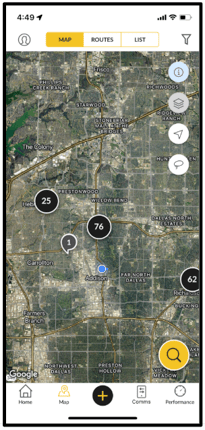
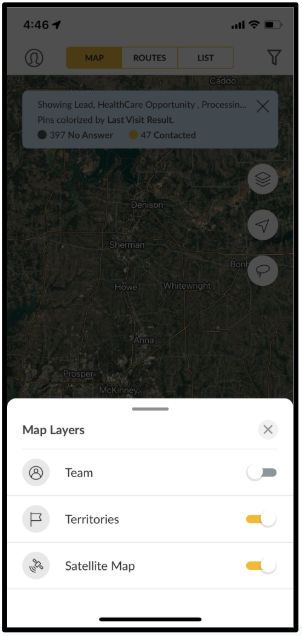
Tap the **Layers Icon** to open the map layers menu. This will display a list of available layers that you can overlay on the map, such as:
- **Territories:** View your assigned territories and boundaries.
- **Team:** Helps you to locate your representatives while they’re in the field or identify their last known location.
- **Satellite Map:** Allows you to see things from a bird eye perspective of real details like building structures, homes, land, rivers and roads
In the layers menu, you’ll see a toggle next to each available layer. To enable a layer, simply tap the toggle next to the layer name. It is activated when you see it's yellow. If you want to remove a layer, tap the selected toggle again to turn it off.
.png?width=300&height=636&name=Screenshot%202024-11-26%20at%204.51.34%20PM%20(1).png)
After selecting your desired layers, the map will update to display the selected data. You can zoom in and out, move the map around, and see the overlaid data in real time.
### FAQ
**Can I adjust the order of layers?**
Currently, layers are shown in a predefined order, but you can toggle individual layers on or off to control which ones appear.
**Why can’t I see all of my selected layers?**
If you're missing a layer, it could be due to the zoom level, network connection, or a layer isn’t on. Make sure your layers are enabled and that your device has a stable internet connection.
**Can I have different layers at one time?**
You can toggle between different layers at any time by reopening the Layers menu and enabling/disabling the options. This flexibility allows you to change your map view based on what you need to focus on at that moment.
**How do I reset the map view?**
If you'd like to return to the default map view with no layers enabled, simply tap the **Layers Icon**, turn off all layers, and the map will return to its original state.
- [Getting started](https://support.spotio.com/getting-started?hsLang=en)
- [Troubleshooting](https://support.spotio.com/troubleshooting?hsLang=en)
- [Integrations](https://support.spotio.com/integrations?hsLang=en)
- [Knowledge Base](https://support.spotio.com/knowledge-base?hsLang=en#main-content)
- [Admin](https://support.spotio.com/knowledge-base?hsLang=en#admin)
- [Sales Rep](https://support.spotio.com/knowledge-base?hsLang=en#sales-rep)
- [Getting Started](https://support.spotio.com/knowledge-base?hsLang=en#getting-started)
- [FAQ](https://support.spotio.com/knowledge-base?hsLang=en#faq)
- [SPOTIO Español](https://support.spotio.com/knowledge-base?hsLang=en#spotio-espa%C3%B1ol)
- [SPOTIO: Troubleshooting](https://support.spotio.com/knowledge-base?hsLang=en#spotio-troubleshooting)
- [Manager](https://support.spotio.com/knowledge-base?hsLang=en#manager)
- [Getting Started: Manager](https://support.spotio.com/knowledge-base?hsLang=en#getting-started-manager)
- [Getting Started: Admin](https://support.spotio.com/knowledge-base?hsLang=en#getting-started-admin)
- [Getting Started: Sales Rep](https://support.spotio.com/knowledge-base?hsLang=en#getting-started-sales-rep)
- [Giving SPOTIO Reviews](https://support.spotio.com/knowledge-base?hsLang=en#giving-spotio-reviews)
- [Release Notes](https://support.spotio.com/release-notes?hsLang=en#main-content)
- [2025 Releases](https://support.spotio.com/release-notes?hsLang=en#2025-releases)
- [2026 Releases](https://support.spotio.com/release-notes?hsLang=en#2026-releases)
- [SPOTIO University](https://support.spotio.com/spotio-university?hsLang=en#main-content)
- [SPOTIO U: On Demand](https://support.spotio.com/spotio-university?hsLang=en#spotio-u-on-demand)
- [Live Training Sessions](https://support.spotio.com/spotio-university?hsLang=en#live-training-sessions)
- [Billing](https://support.spotio.com/billing?hsLang=en)
- [DASH](https://support.spotio.com/dash?hsLang=en)
- [Webinars: On Demand](https://support.spotio.com/webinars-on-demand?hsLang=en#main-content)
- [Feature Spotlight](https://support.spotio.com/webinars-on-demand?hsLang=en#feature-spotlight)
- [Strategy & Best Practices](https://support.spotio.com/webinars-on-demand?hsLang=en#strategy-best-practices)
- [Quick Start Guides](https://support.spotio.com/quick-start-guides?hsLang=en#main-content)
- [Quick Start Videos: Web App Setup Guides](https://support.spotio.com/quick-start-guides?hsLang=en#quick-start-videos-web-app-setup-guides)
- [Quick Start Videos: Mobile App Navigation](https://support.spotio.com/quick-start-guides?hsLang=en#quick-start-videos-mobile-app-navigation)
- [Quick Start Videos: Web App Navigation](https://support.spotio.com/quick-start-guides?hsLang=en#quick-start-videos-web-app-navigation)
[mailto:support@spotio.com](mailto:support@spotio.com)
Copyright © 2026, SPOTIO