---
title: Daily and Weekly Reports
description: Daily and Weekly Reports
---
[Skip to content](https://support.spotio.com/hc/en-us/articles/360040992233-daily-and-weekly-reports#main-content)
English
Show submenu for translations
[](https://support.spotio.com?hsLang=en)
Open main navigation
Close main navigation
- English
Show submenu for translations
How can we help you?
- There are no suggestions because the search field is empty.
1. [SPOTIO Knowledge Base](https://support.spotio.com/?hsLang=en)
2. [Knowledge Base](https://support.spotio.com/knowledge-base?hsLang=en)
3. [Admin](https://support.spotio.com/knowledge-base?hsLang=en#admin)
May 21, 2026
# Daily and Weekly Reports
See how your field team is doing with automated reports from SPOTIO. Having a digest of each rep's performance dashboard automatically sent to your inbox not only simplifies the management process, but it ensures you’re on top of individual and team performance.
### What’s Visible on the Report?
Here’s what’s available on the report so you can decide if you’d like these metrics sent Daily or Weekly for your team:
- Performance Metrics
- Conversion between stages
- Count of Visits (in your time frame)
- Top Performers
- My Reports (if you have allowed them to be)
### How to turn on Daily and Weekly Reports - For Admins
Admins will need to turn on Daily and Weekly Reports from the Web in order for all reps to access and turn these items on.
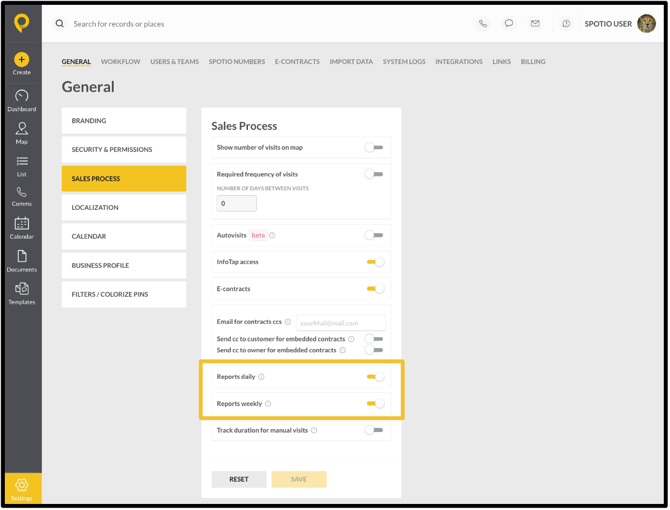
To set up daily and weekly reports:
1. Click on the **Settings** gear on the bottom left.
2. Click **Sales Process**.
3. Toggle on **Reports Daily** and/or **Reports Weekly**.
4. Click **Save**.
### How to turn on Daily and Weekly Reports
Setting up to receive daily and weekly updates via email can only be done on the web app (not on the mobile).
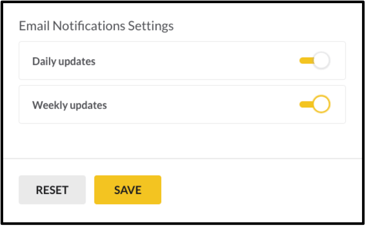
Once logged in to the web app:
1. Click the profile in the top right corner.
2. Select **Profile Settings**.
3. Under *Email Notification Settings*, toggle on the **Daily Updates** and/or **Weekly Updates**.
4. Click **Save**.
### FAQs
**If my Admin turns on Daily/Weekly Reporting, will I receive them automatically?**
Yes, you will need to turn off your Daily/Weekly reports on the Web to stop receiving the reports.
**I tried to turn on the reports but am not receiving them, how do I have them sent to me?**
Make sure that your Account Admin has turned on the Daily/Weekly report option. You will not be able to receive the reports unless this is toggled on by your Administrator.
**Who can receive Daily/Weekly Reports?**
Currently, users with the permission set of Admin or Manager are able to receive the reports. They will be sent to the email on file for the SPOTIO account.
- [Getting started](https://support.spotio.com/getting-started?hsLang=en)
- [Troubleshooting](https://support.spotio.com/troubleshooting?hsLang=en)
- [Integrations](https://support.spotio.com/integrations?hsLang=en)
- [Knowledge Base](https://support.spotio.com/knowledge-base?hsLang=en#main-content)
- [Admin](https://support.spotio.com/knowledge-base?hsLang=en#admin)
- [Sales Rep](https://support.spotio.com/knowledge-base?hsLang=en#sales-rep)
- [Getting Started](https://support.spotio.com/knowledge-base?hsLang=en#getting-started)
- [FAQ](https://support.spotio.com/knowledge-base?hsLang=en#faq)
- [SPOTIO Español](https://support.spotio.com/knowledge-base?hsLang=en#spotio-espa%C3%B1ol)
- [SPOTIO: Troubleshooting](https://support.spotio.com/knowledge-base?hsLang=en#spotio-troubleshooting)
- [Manager](https://support.spotio.com/knowledge-base?hsLang=en#manager)
- [Getting Started: Manager](https://support.spotio.com/knowledge-base?hsLang=en#getting-started-manager)
- [Getting Started: Admin](https://support.spotio.com/knowledge-base?hsLang=en#getting-started-admin)
- [Getting Started: Sales Rep](https://support.spotio.com/knowledge-base?hsLang=en#getting-started-sales-rep)
- [Giving SPOTIO Reviews](https://support.spotio.com/knowledge-base?hsLang=en#giving-spotio-reviews)
- [Release Notes](https://support.spotio.com/release-notes?hsLang=en#main-content)
- [2025 Releases](https://support.spotio.com/release-notes?hsLang=en#2025-releases)
- [2026 Releases](https://support.spotio.com/release-notes?hsLang=en#2026-releases)
- [SPOTIO University](https://support.spotio.com/spotio-university?hsLang=en#main-content)
- [SPOTIO U: On Demand](https://support.spotio.com/spotio-university?hsLang=en#spotio-u-on-demand)
- [Live Training Sessions](https://support.spotio.com/spotio-university?hsLang=en#live-training-sessions)
- [Billing](https://support.spotio.com/billing?hsLang=en)
- [Webinars: On Demand](https://support.spotio.com/webinars-on-demand?hsLang=en#main-content)
- [Feature Spotlight](https://support.spotio.com/webinars-on-demand?hsLang=en#feature-spotlight)
- [Strategy & Best Practices](https://support.spotio.com/webinars-on-demand?hsLang=en#strategy-best-practices)
- [Quick Start Guides](https://support.spotio.com/quick-start-guides?hsLang=en#main-content)
- [Quick Start Videos: Web App Setup Guides](https://support.spotio.com/quick-start-guides?hsLang=en#quick-start-videos-web-app-setup-guides)
- [Quick Start Videos: Mobile App Navigation](https://support.spotio.com/quick-start-guides?hsLang=en#quick-start-videos-mobile-app-navigation)
- [Quick Start Videos: Web App Navigation](https://support.spotio.com/quick-start-guides?hsLang=en#quick-start-videos-web-app-navigation)
[mailto:support@spotio.com](mailto:support@spotio.com)
Copyright © 2026, SPOTIO