---
title: How to Export Data from SPOTIO
description: How to Export Data from SPOTIO
---
[Skip to content](https://support.spotio.com/hc/en-us/articles/6990698466839-how-to-export-data-from-spotio#main-content)
English
Show submenu for translations
[](https://support.spotio.com?hsLang=en)
Open main navigation
Close main navigation
- English
Show submenu for translations
How can we help you?
- There are no suggestions because the search field is empty.
1. [SPOTIO Knowledge Base](https://support.spotio.com/?hsLang=en)
2. [Knowledge Base](https://support.spotio.com/knowledge-base?hsLang=en)
3. [Getting Started: Admin](https://support.spotio.com/knowledge-base?hsLang=en#getting-started-admin)
September 22, 2026
# How to Export Data from SPOTIO
### Overview
Exporting in SPOTIO enables you to generate a **.csv file** of your data, providing flexibility for managing and analyzing Records and Reports outside the platform
Who Can Export?
- **Admins**: Have full Exporting permissions.
- **Managers**: Can Export if their permissions allow it.
### How to Export
To Export data from SPOTIO:
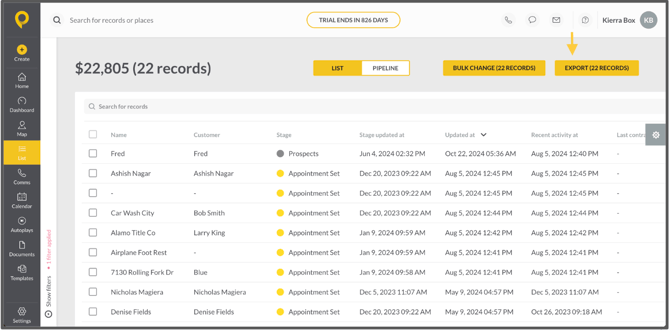
1. Navigate to the top-right corner of your screen.
2. Click the **yellow Export box**.
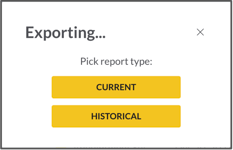
When you click on the yellow Export box, it will give you the option to pick your Export type.
3\. Choose your **Export Type**:
- **Current:** Provides real-time data points.
- **Historical**: Includes transitions of stages and record owners, along with all the information available in the Current Export type.
Your selected data will be processed and ready for download as a **.csv file**.
### What can be Exported?
**Pipeline View and List View**
Both Pipeline View and List View can be Exported. These can be filtered based on the criteria you wish to include.
**Exportable Reports**
You can Export the following reports:
- Activities
- Activity Feed
- Communication Conversion
- Communication Metrics
- Conversion Metrics
- Distance
- Location Verification
- Loss Reasons
- Records Created
- Records Won
- Visits
**My Reports**
You can also create custom reports using **My Reports** to capture specific data tailored to your needs. Once created, these reports can be Exported for further analysis or sharing.
### What's NOT included in Exports?
- Scheduled or Completed Appointments (Dates and Times)
- Activities like meetings or calls
If you would like to report on this information, you can create a **My Report** to reflect this information and can then be Exported.
For a list of all activities that have occurred during a specific timeframe, you can Export the Activity Feed Report under Dashboards.
### FAQs
**Can Lead Machine data be Exported?**
Yes, you can Export Lead Machine data if a custom field has been created for the specific information in your record. This enables you to filter the data and easily Export the relevant details.
**Can I Export a rep's GPS trail?**
No, GPS trails cannot be Exported. However, you can view and Export specific trip details for individual users through the Distance Report on the dashboard. The Exportable details include the date, trip, route, number of stops, total distance, and total time.
**Can I Export a list of deleted records?**
No. Once records are deleted from SPOTIO, they can't be exported or pulled into a list. **Best practice:** Export your records before deleting them so you have a copy of the data if you need it later.
- [Getting started](https://support.spotio.com/getting-started?hsLang=en)
- [Troubleshooting](https://support.spotio.com/troubleshooting?hsLang=en)
- [Integrations](https://support.spotio.com/integrations?hsLang=en)
- [Knowledge Base](https://support.spotio.com/knowledge-base?hsLang=en#main-content)
- [Admin](https://support.spotio.com/knowledge-base?hsLang=en#admin)
- [Sales Rep](https://support.spotio.com/knowledge-base?hsLang=en#sales-rep)
- [Getting Started](https://support.spotio.com/knowledge-base?hsLang=en#getting-started)
- [FAQ](https://support.spotio.com/knowledge-base?hsLang=en#faq)
- [SPOTIO Español](https://support.spotio.com/knowledge-base?hsLang=en#spotio-espa%C3%B1ol)
- [SPOTIO: Troubleshooting](https://support.spotio.com/knowledge-base?hsLang=en#spotio-troubleshooting)
- [Manager](https://support.spotio.com/knowledge-base?hsLang=en#manager)
- [Getting Started: Manager](https://support.spotio.com/knowledge-base?hsLang=en#getting-started-manager)
- [Getting Started: Admin](https://support.spotio.com/knowledge-base?hsLang=en#getting-started-admin)
- [Getting Started: Sales Rep](https://support.spotio.com/knowledge-base?hsLang=en#getting-started-sales-rep)
- [Giving SPOTIO Reviews](https://support.spotio.com/knowledge-base?hsLang=en#giving-spotio-reviews)
- [Release Notes](https://support.spotio.com/release-notes?hsLang=en#main-content)
- [2025 Releases](https://support.spotio.com/release-notes?hsLang=en#2025-releases)
- [2026 Releases](https://support.spotio.com/release-notes?hsLang=en#2026-releases)
- [SPOTIO University](https://support.spotio.com/spotio-university?hsLang=en#main-content)
- [SPOTIO U: On Demand](https://support.spotio.com/spotio-university?hsLang=en#spotio-u-on-demand)
- [Live Training Sessions](https://support.spotio.com/spotio-university?hsLang=en#live-training-sessions)
- [Billing](https://support.spotio.com/billing?hsLang=en)
- [Webinars: On Demand](https://support.spotio.com/webinars-on-demand?hsLang=en#main-content)
- [Feature Spotlight](https://support.spotio.com/webinars-on-demand?hsLang=en#feature-spotlight)
- [Strategy & Best Practices](https://support.spotio.com/webinars-on-demand?hsLang=en#strategy-best-practices)
- [Quick Start Guides](https://support.spotio.com/quick-start-guides?hsLang=en#main-content)
- [Quick Start Videos: Web App Setup Guides](https://support.spotio.com/quick-start-guides?hsLang=en#quick-start-videos-web-app-setup-guides)
- [Quick Start Videos: Mobile App Navigation](https://support.spotio.com/quick-start-guides?hsLang=en#quick-start-videos-mobile-app-navigation)
- [Quick Start Videos: Web App Navigation](https://support.spotio.com/quick-start-guides?hsLang=en#quick-start-videos-web-app-navigation)
[mailto:support@spotio.com](mailto:support@spotio.com)
Copyright © 2026, SPOTIO