---
title: SPOTIO Native Integrations - HailTrace
description: SPOTIO Native Integrations - HailTrace
---
[Skip to content](https://support.spotio.com/hc/en-us/articles/9780974346647-spotio-native-integrations-hailtrace#main-content)
English
Show submenu for translations
[](https://support.spotio.com?hsLang=en)
Open main navigation
Close main navigation
- English
Show submenu for translations
How can we help you?
- There are no suggestions because the search field is empty.
1. [SPOTIO Knowledge Base](https://support.spotio.com/?hsLang=en)
2. [Integrations](https://support.spotio.com/integrations?hsLang=en)
July 28, 2026
# SPOTIO Native Integrations - HailTrace
Have you ever thought to yourself, "HailTrace is awesome, SPOTIO is awesome... I wish I could see HailTrace in SPOTIO". Good news! Our native integration with HailTrace allows you to do just that! With HailTrace integrated with SPOTIO, you can overlay storm swaths from your HailTrace account onto the SPOTIO map so that you can target those areas effectively and ensure that your team isn't the last one to the door when a storm hits.
### Obtaining HailTrace API Key
To integrate your SPOTIO account with HailTrace, you will need to obtain an API key from HailTrace.
To retrieve a HailTrace API Key:
1. Visit HailTrace on the web and log in to your account.
2. Click on **Settings** and select **API Keys**.
3. Click on **Create New API Key** or use an existing one.
4. Give the new API key a name and select **SPOTIO** under the Application dropdown menu.
5. Choose the desired scope options for the API key.
6. Click **Save** to generate the API key and copy the code.
### Integrating HailTrace with SPOTIO
To connect HailTrace to SPOTIO:
1. Log in to your SPOTIO account on the web app.
2. Click on **Settings** and select **Integration**.
3. Select **HailTrace** from the list of integrations.
4. Paste the HailTrace API key in the provided field.
5. Click **Connect** to authorize the integration.
6. Wait for the status to confirm that the integration is connected successfully.
Once connected, you will see a new icon for HailTrace in the toolbar to the right on the Map view in SPOTIO. You can click on this icon to Enable the HailTrace layer.
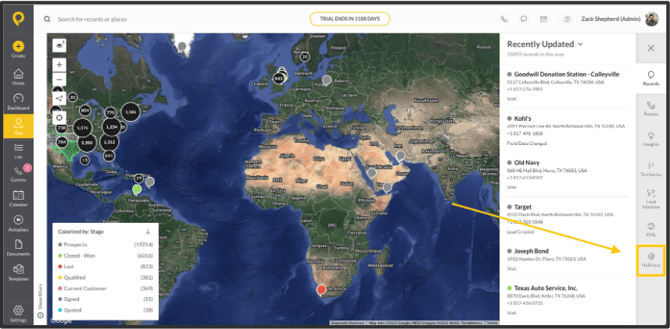
After the HailTrace layer is enabled, you are able to see storm data in the area represented by the green circle on your Map.
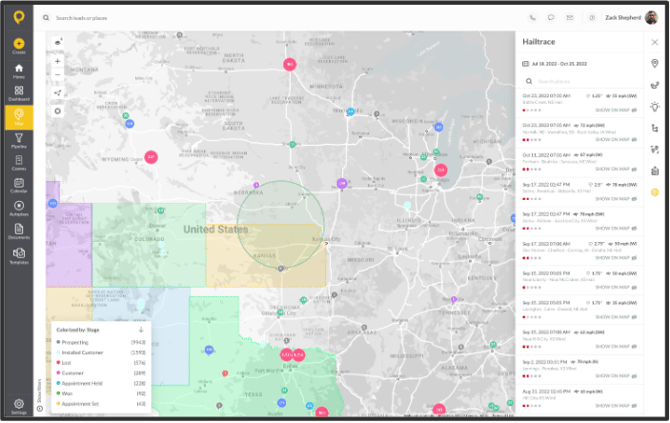
You can use the panel on the right side of the screen to display a storm swath on the SPOTIO map, and view storm data including location, date, severity, wind speed, hail, and rainfall.
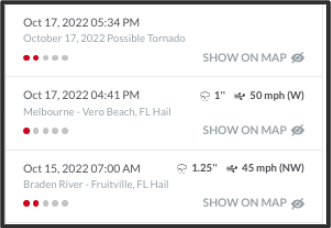
Select the storm you want to overlay on the SPOTIO map and click 'Show on Map' to display the storm swath.
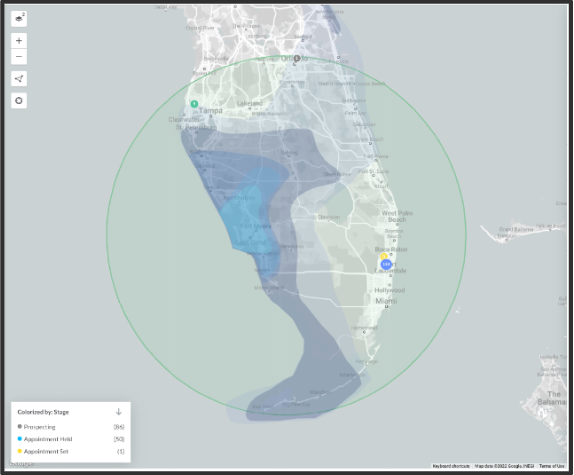
Once you have overlapped the storm swath of choice, you can create a territory around that area and assign your team to that territory to focus your team's efforts on the areas where damage is prevalent. You will need to create a territory around the storm damage in order for the storm area to be visible on the mobile app. To learn more about creating territories, please check out the[Territory Management: Creating and Managing Territories](https://support.spotio.com/hc/en-us/articles/360005805374-Territory-Management-Creating-and-Managing-Territories?hsLang=en) Knowledge Base article.
### FAQs
**Will I be able to see all the storms?**
You will only be able to see the storms you have purchased in your HailTrace account.
**Who has access to see the storm swaths and create the territories around these swaths?**
Admins and managers provided you give managers access to create territories.
- [Getting started](https://support.spotio.com/getting-started?hsLang=en)
- [Troubleshooting](https://support.spotio.com/troubleshooting?hsLang=en)
- [Integrations](https://support.spotio.com/integrations?hsLang=en)
- [Knowledge Base](https://support.spotio.com/knowledge-base?hsLang=en#main-content)
- [Admin](https://support.spotio.com/knowledge-base?hsLang=en#admin)
- [Sales Rep](https://support.spotio.com/knowledge-base?hsLang=en#sales-rep)
- [Getting Started](https://support.spotio.com/knowledge-base?hsLang=en#getting-started)
- [FAQ](https://support.spotio.com/knowledge-base?hsLang=en#faq)
- [SPOTIO Español](https://support.spotio.com/knowledge-base?hsLang=en#spotio-espa%C3%B1ol)
- [SPOTIO: Troubleshooting](https://support.spotio.com/knowledge-base?hsLang=en#spotio-troubleshooting)
- [Manager](https://support.spotio.com/knowledge-base?hsLang=en#manager)
- [Getting Started: Manager](https://support.spotio.com/knowledge-base?hsLang=en#getting-started-manager)
- [Getting Started: Admin](https://support.spotio.com/knowledge-base?hsLang=en#getting-started-admin)
- [Getting Started: Sales Rep](https://support.spotio.com/knowledge-base?hsLang=en#getting-started-sales-rep)
- [Giving SPOTIO Reviews](https://support.spotio.com/knowledge-base?hsLang=en#giving-spotio-reviews)
- [Release Notes](https://support.spotio.com/release-notes?hsLang=en#main-content)
- [2025 Releases](https://support.spotio.com/release-notes?hsLang=en#2025-releases)
- [2026 Releases](https://support.spotio.com/release-notes?hsLang=en#2026-releases)
- [SPOTIO University](https://support.spotio.com/spotio-university?hsLang=en#main-content)
- [SPOTIO U: On Demand](https://support.spotio.com/spotio-university?hsLang=en#spotio-u-on-demand)
- [Live Training Sessions](https://support.spotio.com/spotio-university?hsLang=en#live-training-sessions)
- [Billing](https://support.spotio.com/billing?hsLang=en)
- [Webinars: On Demand](https://support.spotio.com/webinars-on-demand?hsLang=en#main-content)
- [Feature Spotlight](https://support.spotio.com/webinars-on-demand?hsLang=en#feature-spotlight)
- [Strategy & Best Practices](https://support.spotio.com/webinars-on-demand?hsLang=en#strategy-best-practices)
- [Quick Start Guides](https://support.spotio.com/quick-start-guides?hsLang=en#main-content)
- [Quick Start Videos: Web App Setup Guides](https://support.spotio.com/quick-start-guides?hsLang=en#quick-start-videos-web-app-setup-guides)
- [Quick Start Videos: Mobile App Navigation](https://support.spotio.com/quick-start-guides?hsLang=en#quick-start-videos-mobile-app-navigation)
- [Quick Start Videos: Web App Navigation](https://support.spotio.com/quick-start-guides?hsLang=en#quick-start-videos-web-app-navigation)
[mailto:support@spotio.com](mailto:support@spotio.com)
Copyright © 2026, SPOTIO