---
title: "Mobile Release 2.50: What's New in Your SPOTIO App"
description: This article covers an overview of a recent mobile release that contains multiple UI/UX changes on mobile
---
[Skip to content](https://support.spotio.com/mobile-release-2.50-whats-new-in-your-spotio-app#main-content)
English
Show submenu for translations
[](https://support.spotio.com?hsLang=en)
Open main navigation
Close main navigation
- English
Show submenu for translations
How can we help you?
- There are no suggestions because the search field is empty.
1. [SPOTIO Knowledge Base](https://support.spotio.com/?hsLang=en)
2. [Release Notes](https://support.spotio.com/release-notes?hsLang=en)
3. [2026 Releases](https://support.spotio.com/release-notes?hsLang=en#2026-releases)
July 2, 2026
# Mobile Release 2.50: What's New in Your SPOTIO App
We've given the SPOTIO mobile app a fresh new look! Mobile 2.50 is the biggest visual update we've made in years, redesigning Home, your Records List, Record Detail, Calendar, Routing, and the Map to help you move faster in the field. This article walks you through what's new, what's stayed the same, and where to find your favorite features.
### **The Short Version**
- **Nothing was removed** – everything you could do before, you can still do. A few things simply live in new, easier-to-reach places.
- **It's a fresh look, not a new tool** – this update modernizes the design. Your data, records, and workflows all work exactly as they did before.
### **What's New on Each Screen**
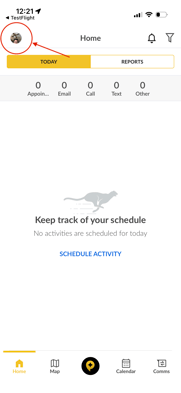
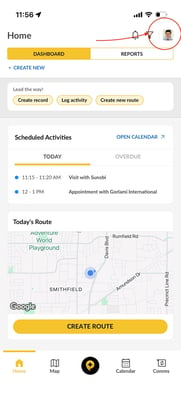
- **Settings -** Your profile and settings are in the right hand corner of your screen next to the filter funnel.
- Before vs. After
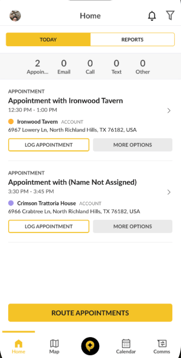
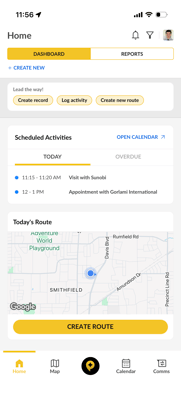
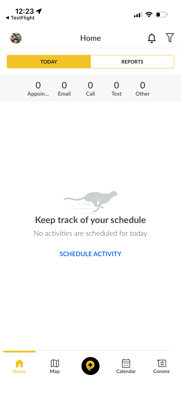
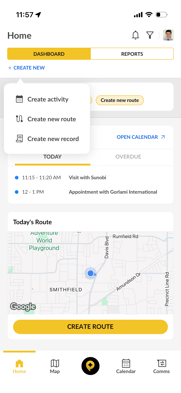
- **Home Screen** - See your day at a glance with new widgets for today's activities (Today/Overdue tabs) and your upcoming route, all under a cleaner top bar.
- Before vs. After
- 
- **Create New** - Blue text on left side of screen, click while in Home, Map and Calendar view to create new activity, record or route.
- Before vs. After
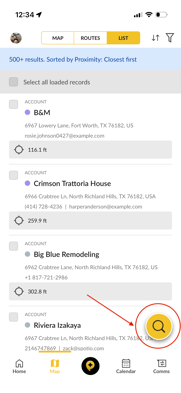
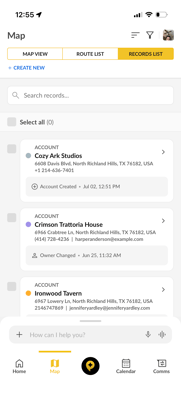
- **Records List** - Search now lives right at the top of the list, and you've got more ways to filter and sort so you can find what you need faster. Record cards also got a cleaner, easier-to-read design.
- Before vs. After
- 
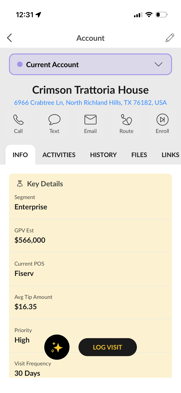
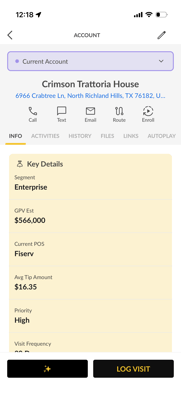
- **Record Detail** - A cleaner layout makes your fields, history, and actions easier to scan.
- Before vs. After
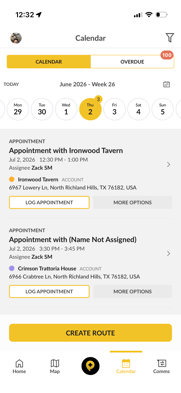
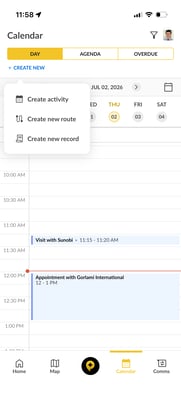
- **Calendar** - New Day and Agenda views, plus a dedicated Overdue screen, make it easier to plan your day. Scheduling a new activity (“+ Create New”) works just like before.
- Before vs. After
- **Routing** - Building and editing a route now happens in a quick bottom sheet instead of a full screen, so you can get moving faster.
- Before vs. After
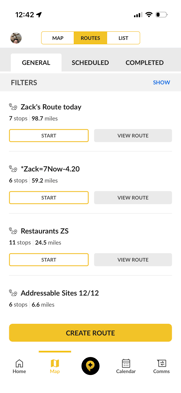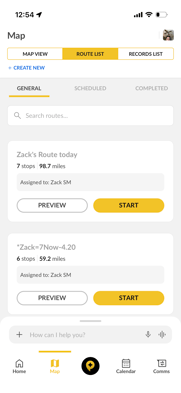
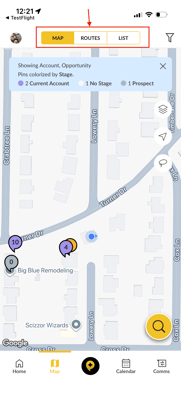
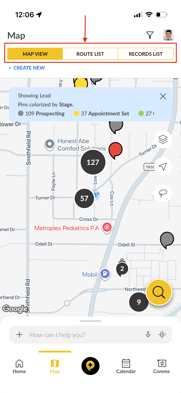
- **Map** - Tap a pin and you'll see the new record card design, with all the same actions, filters, and colorization options you already know.
- Before vs. After
### **Where Did It Go?**
New layouts take a few days to get used to. If you're looking for something and can't find it, it most likely just moved, here's a quick cheat sheet.
| **What you're looking for** | **Where it was** | **Where it is now** |
| --- | --- | --- |
| **Settings** | Left Corner of Screen | Right Corner of Screen |
| **Search** | Home screen search bar | Top of the Records List |
| **Create or edit a route** | Full-screen route form | Bottom sheet on the Map (same fields) |
| **Today's activities** | Calendar | Home widget (Today/Overdue) and Calendar |
| **Record info on the map** | Pin info card | Redesigned pin card — same actions |
| **Sorting & filtering** | Filter menu | Same menu, with more options |
### **FAQs**
**Did I lose any functionality in Mobile 2.50?**
Nope! Every feature available before is still available today, a few actions simply live in a new spot. Check the table above for the most common ones.
**Why can't I find the search bar on my Home screen anymore?**
Search moved from the Home screen to the top of the Records List, where it works exactly the way it always has.
**Who do I contact if a feature seems to be missing?**
Reach out to your Customer Success Manager or SPOTIO Support. We'll help you track it down, and if something is genuinely missing, we'll flag it to our product team right away.
- [Getting started](https://support.spotio.com/getting-started?hsLang=en)
- [Troubleshooting](https://support.spotio.com/troubleshooting?hsLang=en)
- [Integrations](https://support.spotio.com/integrations?hsLang=en)
- [Knowledge Base](https://support.spotio.com/knowledge-base?hsLang=en#main-content)
- [Admin](https://support.spotio.com/knowledge-base?hsLang=en#admin)
- [Sales Rep](https://support.spotio.com/knowledge-base?hsLang=en#sales-rep)
- [Getting Started](https://support.spotio.com/knowledge-base?hsLang=en#getting-started)
- [FAQ](https://support.spotio.com/knowledge-base?hsLang=en#faq)
- [SPOTIO Español](https://support.spotio.com/knowledge-base?hsLang=en#spotio-espa%C3%B1ol)
- [SPOTIO: Troubleshooting](https://support.spotio.com/knowledge-base?hsLang=en#spotio-troubleshooting)
- [Manager](https://support.spotio.com/knowledge-base?hsLang=en#manager)
- [Getting Started: Manager](https://support.spotio.com/knowledge-base?hsLang=en#getting-started-manager)
- [Getting Started: Admin](https://support.spotio.com/knowledge-base?hsLang=en#getting-started-admin)
- [Getting Started: Sales Rep](https://support.spotio.com/knowledge-base?hsLang=en#getting-started-sales-rep)
- [Giving SPOTIO Reviews](https://support.spotio.com/knowledge-base?hsLang=en#giving-spotio-reviews)
- [Release Notes](https://support.spotio.com/release-notes?hsLang=en#main-content)
- [2025 Releases](https://support.spotio.com/release-notes?hsLang=en#2025-releases)
- [2026 Releases](https://support.spotio.com/release-notes?hsLang=en#2026-releases)
- [SPOTIO University](https://support.spotio.com/spotio-university?hsLang=en#main-content)
- [SPOTIO U: On Demand](https://support.spotio.com/spotio-university?hsLang=en#spotio-u-on-demand)
- [Live Training Sessions](https://support.spotio.com/spotio-university?hsLang=en#live-training-sessions)
- [Billing](https://support.spotio.com/billing?hsLang=en)
- [Webinars: On Demand](https://support.spotio.com/webinars-on-demand?hsLang=en#main-content)
- [Feature Spotlight](https://support.spotio.com/webinars-on-demand?hsLang=en#feature-spotlight)
- [Strategy & Best Practices](https://support.spotio.com/webinars-on-demand?hsLang=en#strategy-best-practices)
- [Quick Start Guides](https://support.spotio.com/quick-start-guides?hsLang=en#main-content)
- [Quick Start Videos: Web App Setup Guides](https://support.spotio.com/quick-start-guides?hsLang=en#quick-start-videos-web-app-setup-guides)
- [Quick Start Videos: Mobile App Navigation](https://support.spotio.com/quick-start-guides?hsLang=en#quick-start-videos-mobile-app-navigation)
- [Quick Start Videos: Web App Navigation](https://support.spotio.com/quick-start-guides?hsLang=en#quick-start-videos-web-app-navigation)
[mailto:support@spotio.com](mailto:support@spotio.com)
Copyright © 2026, SPOTIO